When an application misbehaves, logs are usually the first place developers look. But logs mix normal requests, warnings, errors, retries and timestamps, and they rarely say directly what went wrong. Scanning them by hand takes time.
The author wanted to answer a practical question: how useful can a small model be inside a real developer workflow? He ran MiniCPM5-2B locally through Ollama and connected it to OpenClaw as the agent layer, building a local log-analysis assistant. It is not meant to replace production observability platforms or experienced engineers. It handles the first pass of troubleshooting, and inference stays on your own machine.

Application Logs
       ↓
    OpenClaw
       ↓
     Ollama
       ↓
  MiniCPM5-2B
       ↓
   Log Analysis
       ↓
Errors • Warnings • Evidence
       ↓
Troubleshooting Plan
Besides showing the working pipeline, the article also looks at the model's limits: where it does well, where it states conclusions the log does not support, and how prompting can separate confirmed evidence from possible causes.
Test Environment
| Item | Configuration |
|---|---|
| OS | Ubuntu 24.04 LTS VM |
| CPU | 8 vCPU (Intel Xeon Platinum 8171M @ 2.60 GHz) |
| Memory | 31 GiB |
| GPU | None, CPU-only inference |
| Storage | 30 GB OS disk |
| Ollama / OpenClaw | 0.34.2 / 2026.9.3 |
| Model | MiniCPM5-2B, GGUF Q4_K_M, about 1.56 GB |
| Context | 16,384 tokens in use (model supports up to 131,072) |
The same workflow runs on a local machine with enough memory and disk. The author used a VM for a stable environment isolated from other laptop workloads. All performance numbers below come from this VM.
Setup
1. Install Ollama and verify the API
curl -fsSL https://ollama.com/install.sh | sh
ollama --version
systemctl status ollama --no-pager
curl http://127.0.0.1:11434/api/tags   # {"models":[]} is expected before any model is installed
2. Download the MiniCPM5-2B GGUF with the Hugging Face CLI
On Ubuntu 24.04, install Python packages in a virtual environment:
sudo apt update
sudo apt install -y python3-pip python3-venv
python3 -m venv ~/hf-env
source ~/hf-env/bin/activate        # use activate.fish for fish
pip install -U huggingface_hub

mkdir -p ~/models/minicpm5 && cd ~/models/minicpm5
hf download openbmb/MiniCPM5-2B-GGUF MiniCPM5-2B-Q4_K_M.gguf --local-dir .

3. Import into Ollama
The model is already on disk, so there is no need to pull it again. A Modelfile imports the local file directly:
FROM ./MiniCPM5-2B-Q4_K_M.gguf
PARAMETER temperature 1.0
PARAMETER top_p 0.95
PARAMETER num_ctx 8192
cd ~/models/minicpm5
ollama create minicpm5-2b -f Modelfile
ollama list
ollama run minicpm5-2b
The sampling parameters follow the MiniCPM5 recommendations. An 8192-token context is a practical choice for this VM.
4. Test the API on its own
Rather than debugging OpenClaw and Ollama at the same time, the author verified the API first:
curl http://127.0.0.1:11434/api/generate \
  -d '{"model": "minicpm5-2b", "prompt": "Explain AI agents in 3 sentences.", "stream": false}'
On this CPU-only VM, generating 428 tokens took about 18.6 seconds, roughly 23 tokens per second. A one-sentence reply took about 4.95 seconds; longer answers make CPU latency more noticeable. The model may also emit reasoning before the final answer, so an agent integration should pass only the final response to the user.

5. Connect OpenClaw
openclaw config set models.providers.ollama.api "ollama"
openclaw config set models.providers.ollama.baseUrl "http://127.0.0.1:11434"
openclaw config set models.providers.ollama.models '[{"id":"minicpm5-2b","name":"minicpm5-2b","input":["text"],"contextTokens":8192,"params":{"num_ctx":8192,"thinking":false}}]' --strict-json
openclaw models list --provider ollama

openclaw agent exec \
  --model ollama/minicpm5-2b \
  --thinking off \
  --local-model-lean \
  "Explain what an AI agent is in 3 sentences."
--thinking off keeps the test focused on the final answer, and --local-model-lean reduces the number of tools exposed to the local model, which helps a small 2B model. stopReason=stop confirms the pipeline works.

At this point the whole chain, OpenClaw → Ollama → MiniCPM5-2B, runs locally with no external model API.
Three Rounds on a Sample Log
To keep things reproducible, the author wrote a short but realistic log with normal requests, warnings, database timeouts, retries, a recovery and cache issues:
2026-09-18 09:41:02 INFO  Application starting
2026-09-18 09:41:03 INFO  Loading configuration
2026-09-18 09:41:04 INFO  Database connection initialized
2026-09-18 09:41:05 INFO  HTTP server listening on port 8080
2026-09-18 09:42:11 INFO  GET /api/users 200 42ms
2026-09-18 09:42:15 INFO  GET /api/products 200 38ms
2026-09-18 09:43:07 WARN  Database connection pool nearing capacity
2026-09-18 09:43:22 ERROR Database connection timeout
2026-09-18 09:43:22 ERROR Failed to execute query: connection unavailable
2026-09-18 09:43:23 WARN  Retrying database connection attempt 1/3
2026-09-18 09:43:25 ERROR Database connection timeout
2026-09-18 09:43:25 WARN  Retrying database connection attempt 2/3
2026-09-18 09:43:28 INFO  Database connection restored
2026-09-18 09:43:29 INFO  GET /api/users 200 51ms
2026-09-18 09:44:01 ERROR Failed to load cache entry: key=user_1842
2026-09-18 09:44:02 WARN  Cache miss rate above threshold
2026-09-18 09:45:11 INFO  GET /api/products 200 44ms
Round 1: Plain analysis
openclaw agent exec \
  --model ollama/minicpm5-2b \
  --thinking off \
  --local-model-lean \
  "Analyze this application log and identify the errors, warnings, likely problem areas, and a concise troubleshooting plan:
$(cat ~/openclaw-log-hunter/application.log)"
The model found the database connection failures and cache errors, pointed out likely problem areas and produced a troubleshooting plan, all without sending the log to an external service.
The catch: it sometimes presented inferences as facts. The log only says the pool was nearing capacity, but the model said the pool was fully exhausted.

Round 2: Structured incident report
This round fixed the output format to eight sections: incident summary, errors, warnings, log evidence, likely causes, troubleshooting steps, severity, and uncertain or missing information.
The model followed the structure. It listed both database timeouts, the failed query and the cache load failure, organized the warnings and timeline, and gave causes and next steps that were far more useful than a generic summary. It still drew some conclusions the log cannot prove; a cache miss, for example, does not explain why the entry was missing.

Round 3: Separating evidence from hypotheses
The final prompt added explicit rules:
- Only state something as a fact if it is directly supported by the log.
- Do not invent events, timestamps, metrics, configuration values, or system behavior.
- Clearly label hypotheses as possible causes.
- Calculate time differences carefully from the timestamps.
- If the log does not contain enough information to determine something, say so.
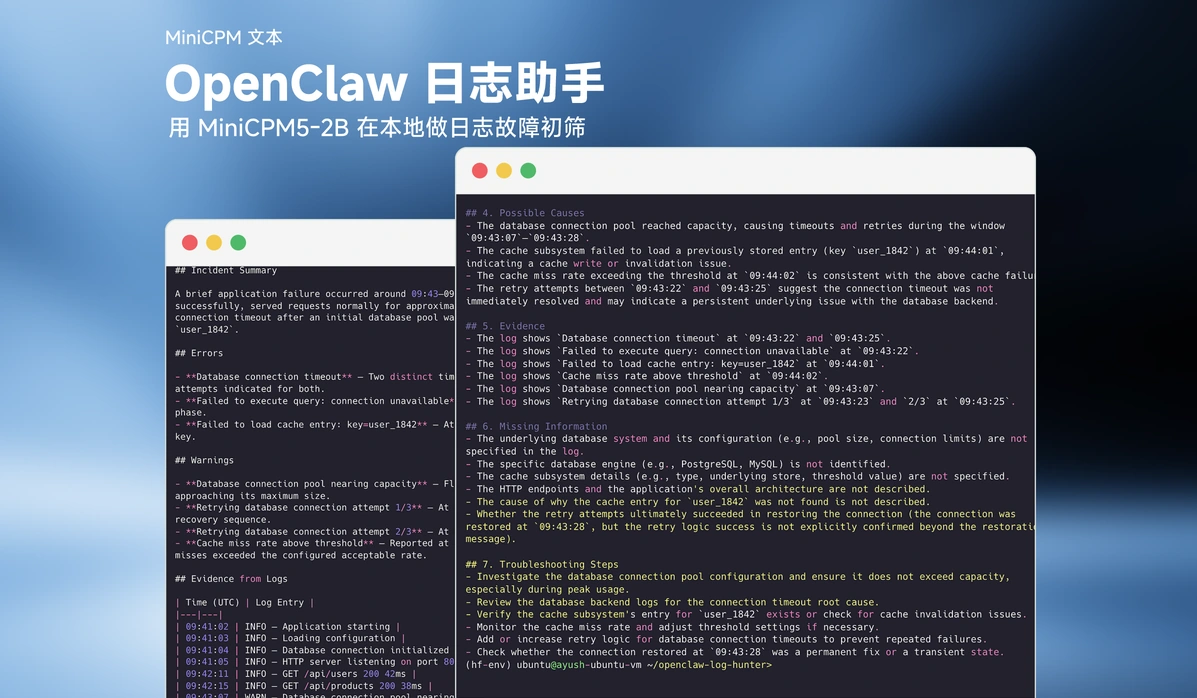
The output was split into confirmed errors, confirmed warnings, timeline, possible causes, evidence, missing information and troubleshooting steps.
This report was much more evidence-based. Errors and warnings quoted the log directly, and the timeline ran from the 09:43:22 timeout to the 09:43:28 recovery. Connection pool pressure was labeled as a possible cause rather than a conclusion. The model also listed what the log does not contain: database type, pool configuration and size, cache implementation, the root cause of the timeouts, and why the cache entry failed to load.
That is exactly what a first-pass troubleshooting tool should do.

Takeaways
The interesting part is not that MiniCPM5-2B can summarize logs. With a well-scoped task and constrained output, a local 2B model can serve as a dependable first-pass analysis tool: it identifies errors and warnings, reconstructs a timeline, produces an incident report, suggests possible causes, flags missing information and proposes next steps.
The experiment also exposed a key limitation: the model can give plausible explanations that go beyond the evidence in the log. Its output should be treated as troubleshooting clues, not proof of root cause. Final diagnosis still requires checking the actual application, infrastructure, metrics and service configuration.
A local 2B model will not replace a full observability stack or an experienced engineer. But for a private first look at application logs, without sending them to a hosted model, it is already useful.
Links
- Original article (Medium): From Raw Logs to Root-Cause Clues with OpenClaw & MiniCPM5-2B
- Model: openbmb/MiniCPM5-2B-GGUF