PilotDeck can turn raw material into a ready-to-use Excel workbook, automatically handling data extraction, validation, cleanup, aggregation and anomaly flagging while keeping the evidence behind each check. This case study covers three scenarios common in real work — attendance statistics, expense auditing and asset inventory — showing the full path from raw records to a reviewable spreadsheet.
1. Attendance Statistics
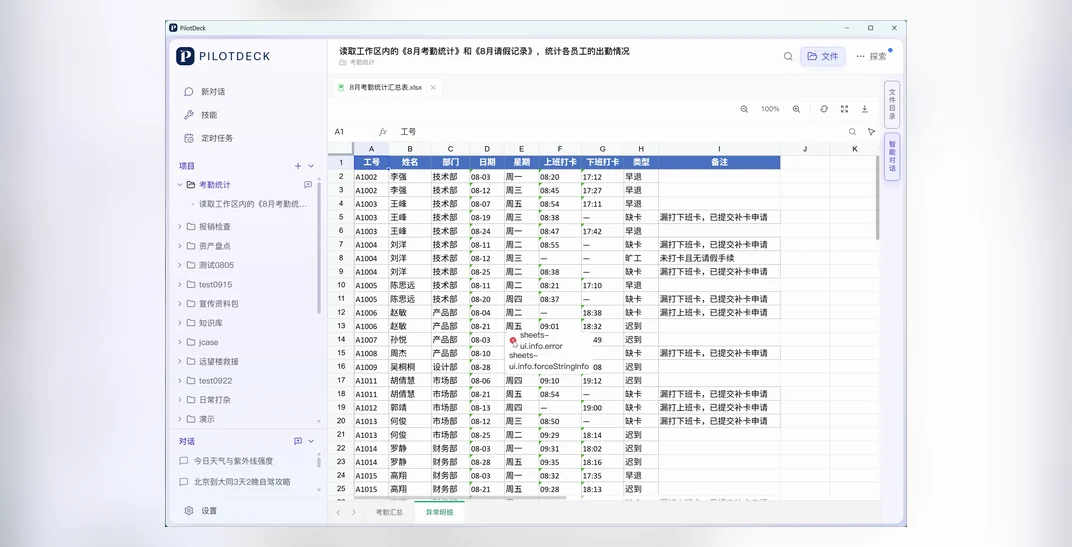
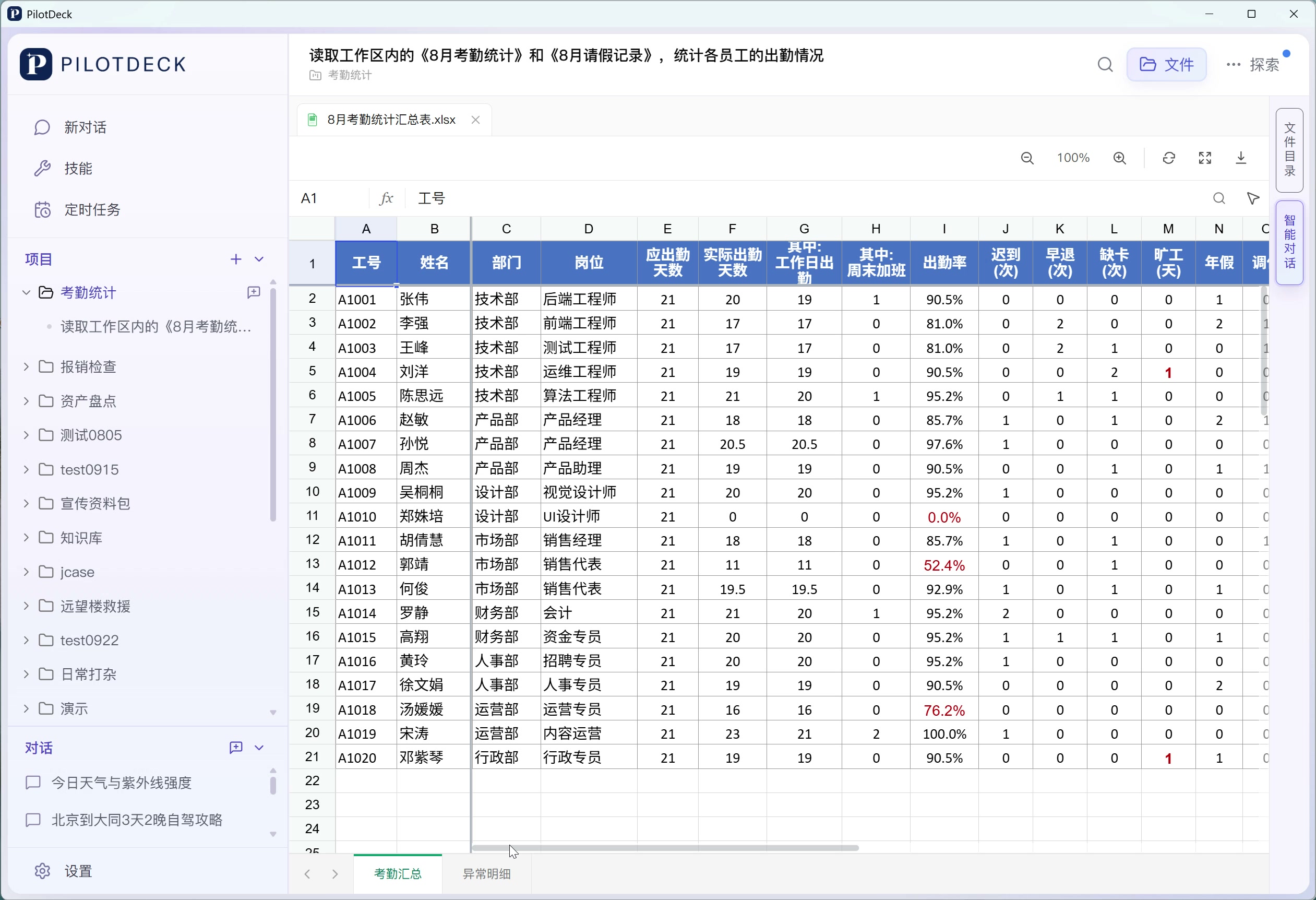
When to use it and what to prepare: suitable for HR work that requires monthly summaries of attendance rates, late arrivals and early departures, missed punches and leave. This case uses 《8月考勤统计》(August Attendance Statistics) and 《8月请假记录》(August Leave Records) from the workspace, with the goal of producing an attendance summary for each employee along with a list of anomalies to verify.
How to do it:
- Put the attendance sheet and leave records in the same workspace, and specify the month to analyze and the range of employees to check.
- Explain the counting rules for working days, half-day leave, weekend overtime and so on, and require the two records for the same employee to be linked.
- Summarize expected attendance, actual attendance, attendance rate and leave; list late arrivals, early departures, missed punches and similar cases separately in a detail sheet.
- Open the generated workbook and check the employees, dates and anomaly flags; manually review any items where the rules are unclear or the records conflict.
Example instruction:
Please read 《8月考勤统计》and 《8月请假记录》in the workspace and summarize this month's attendance by employee. Cross-check the attendance and leave data, and report expected attendance, actual attendance, attendance rate, late arrivals and early departures, missed punches and leave details; count half-day leave as 0.5 days. Put the summary and the anomalies to be verified into separate Excel worksheets, and explain the counting rules used.
Process and results: this case shows the per-employee summary produced after cross-checking the two data sources, the anomaly notes and a preview of the Excel file. The generated workbook contains "考勤汇总" (Attendance Summary) and "异常明细" (Anomaly Details), which you can continue to review by employee or by anomaly type.
2. Expense Auditing
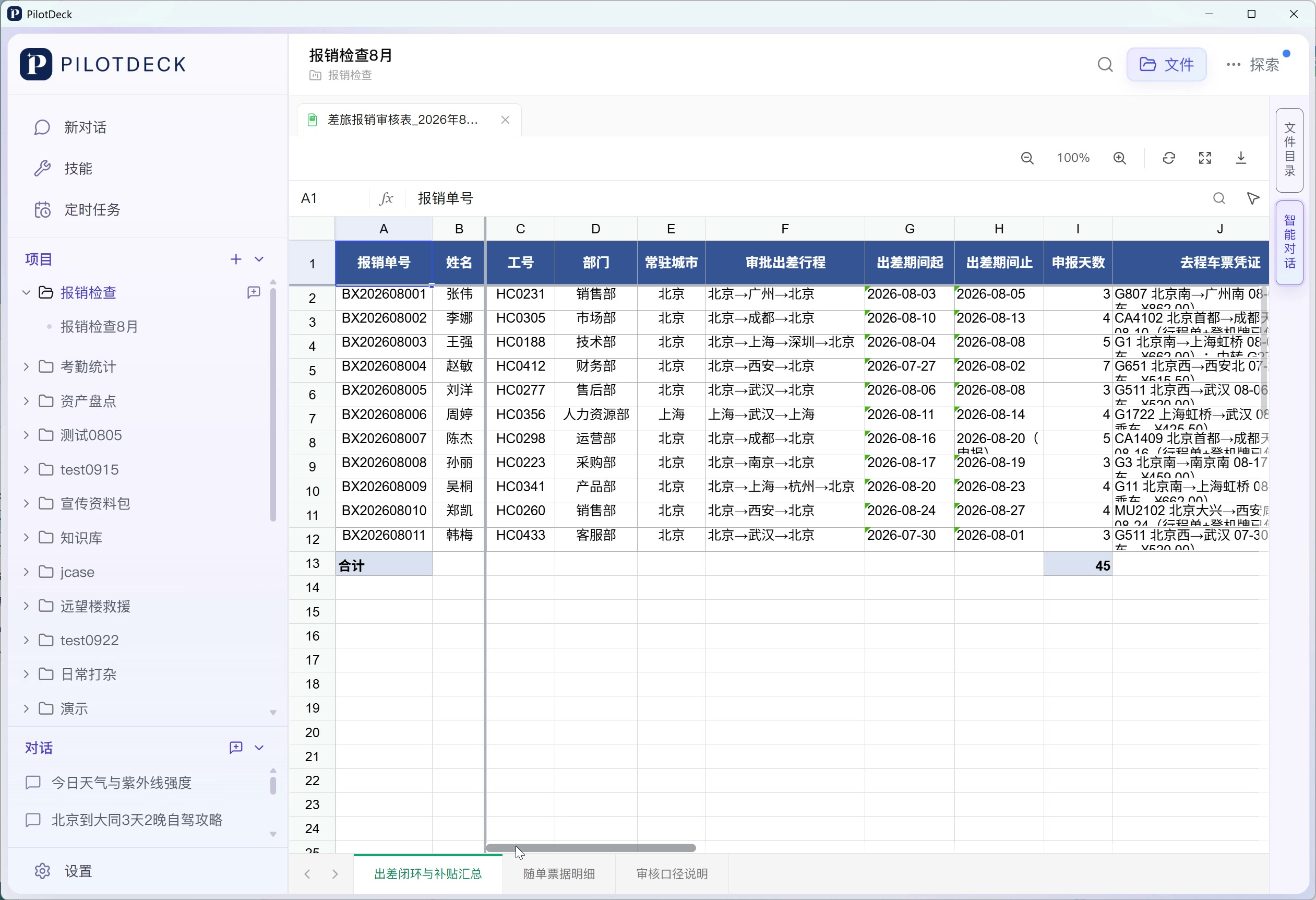
When to use it and what to prepare: suitable for reviewing a batch of travel expenses containing multiple expense claims and a large number of attachments. This case reads the 《差旅报销数据_2026年8月提交》(Travel Expense Data, Submitted August 2026) folder in the workspace, whose material includes expense claims, approval forms, train or plane tickets, hotel invoices and written explanations. The task is to determine whether the outbound trip, return trip and accommodation corroborate one another, and to calculate the travel allowance using an example rule of 240 CNY per day.
How to do it:
- Provide the complete folder of expense material, and explain how each claim is identified, the scope of the review and the allowance rule that applies to this batch.
- Have PilotDeck match the application, transport and accommodation receipts claim by claim, checking that dates, locations and people are consistent.
- Distinguish between claims with complete material, claims missing a receipt but with a signed explanation, claims needing closer verification, and so on, keeping the evidence behind each judgement.
- Open the audit workbook, review the problematic receipts, the approved number of days and the allowance amounts, then let the reviewer make the final decision.
Example instruction:
Please read the material in the 《差旅报销数据_2026年8月提交》folder and, claim by claim, compile the travel dates, outbound and return transport, accommodation invoices and approval notes. Determine whether each itinerary and its receipts form a closed loop, and flag missing receipts, date conflicts and other items to verify; calculate the travel allowance using this batch's rule of 240 CNY per day. Generate an Excel audit sheet containing the per-claim summary, the receipt details and the review rules, and keep the evidence behind each conclusion.
Process and results: this case shows the audit conclusions produced after collecting the material claim by claim, along with the generated Excel workbook. The workbook is split into three worksheets — "出差闭环与补贴汇总" (Trip Closure and Allowance Summary), "随单票据明细" (Receipt Details by Claim) and "审核口径说明" (Review Rules) — and problematic receipts and open items can be traced further within the sheets.
3. Asset Inventory
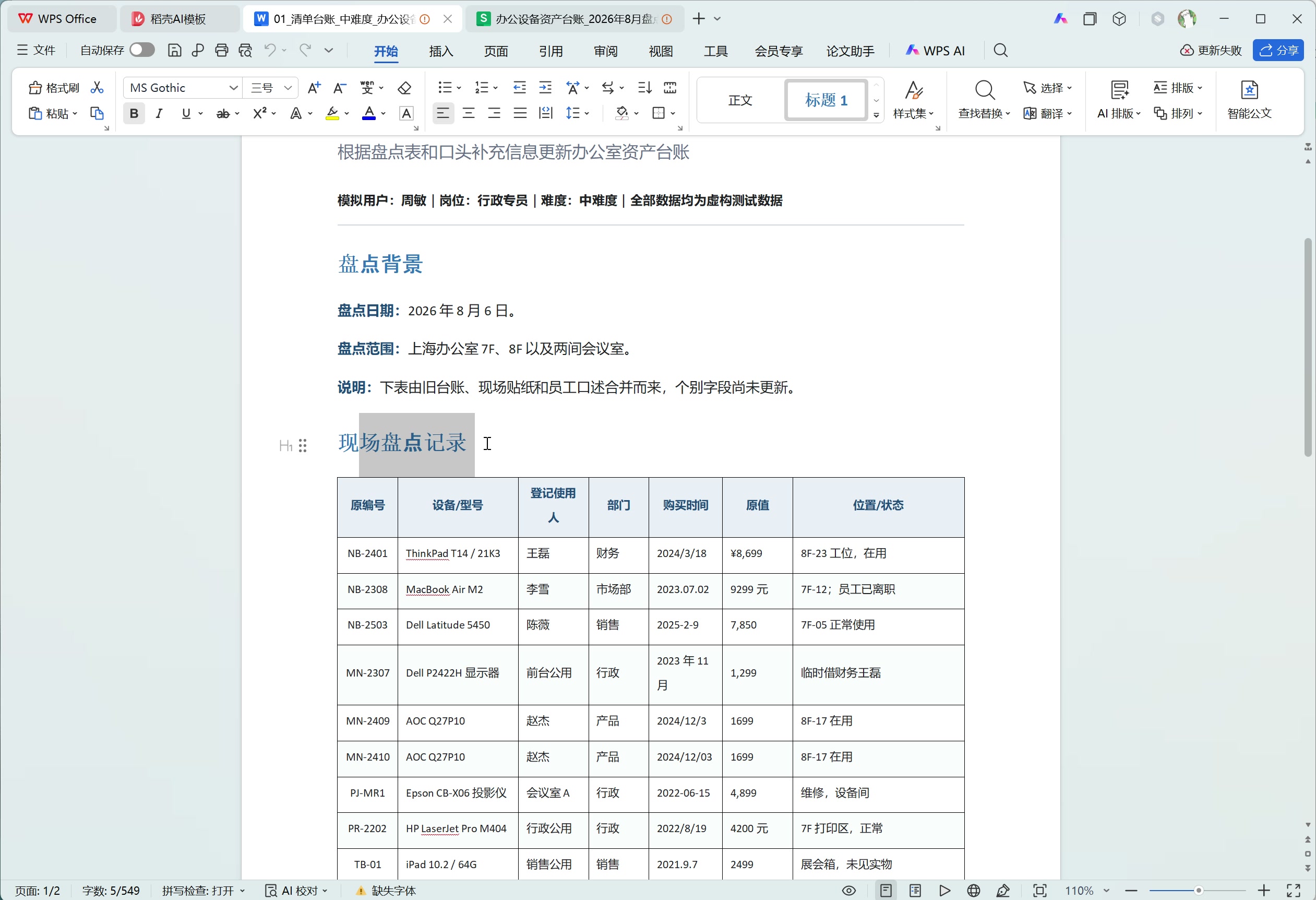
When to use it and what to prepare: suitable for an administrative team turning monthly inventory records into an asset register. The input for this case is 《办公设备盘点记录(8月)》(Office Equipment Inventory Records, August), and the goal is to generate an Excel workbook containing the asset register, a category summary, open items and a parameters sheet.
How to do it:
- Provide the raw inventory records and specify fields such as asset ID, name, category, owning department, user, location, purchase date, original value and status.
- Explain the unified rules for dates, amounts and statuses; newer information in the notes takes priority over the original records, and missing data is marked "待补录" (to be filled in).
- Require the register to support filtering and frozen headers, the category summary to aggregate by category, department and status, and the open-items sheet to collect the assets that need follow-up.
- Open the workbook and check the number of assets, the categories and the total original value, then verify the warranty calculations and highlighting before putting it into everyday use.
Example instruction:
Please build a ready-to-use Excel workbook from 《办公设备盘点记录(8月)》. Create "资产台账" (Asset Register), "分类汇总" (Category Summary), "待处理事项" (Open Items) and "参数表" (Parameters): the register should organize each piece of equipment, unify dates, amounts and statuses, and support filtering; the summary should report the quantity and original value for each asset category; the open-items sheet should list equipment with missing information, unconfirmed locations, under repair, or nearing warranty expiry. Keep the original evidence, don't guess missing information, and maintain the statistics using refreshable formulas or pivot tables.
Process and results: this case shows the process of generating an Excel workbook from the inventory records and then reviewing the equipment register, category summary and open items in the spreadsheet. The generated register supports filtering by equipment, and status and warranty reminders are highlighted in prominent colors.