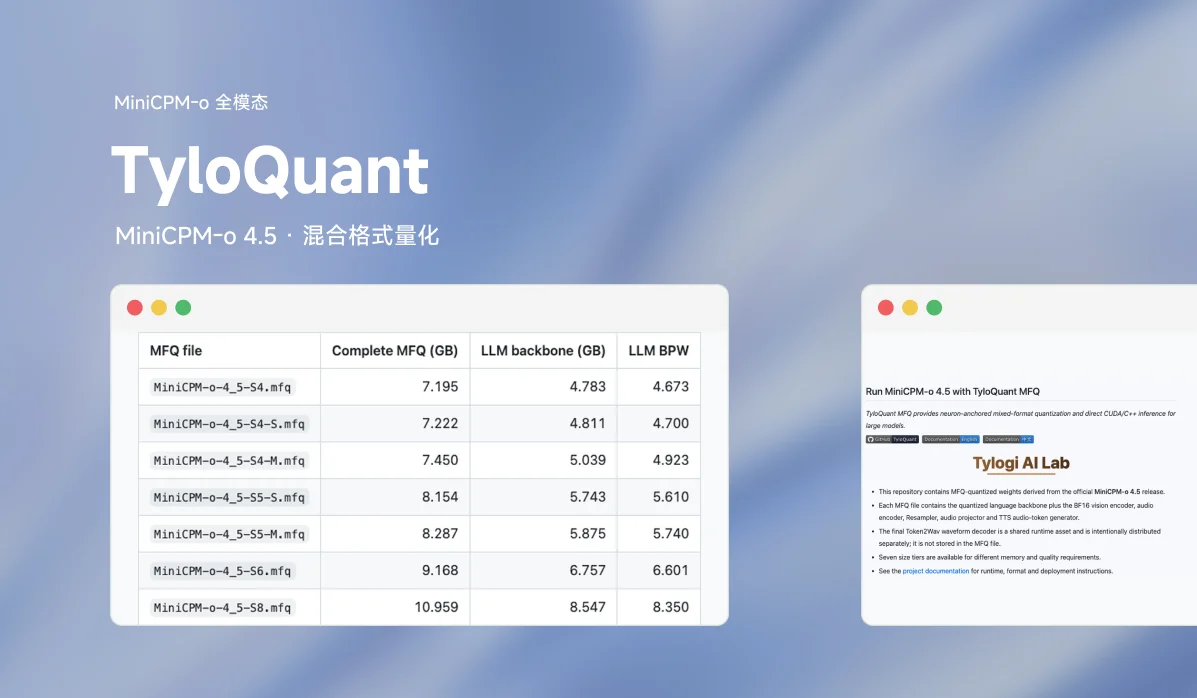
MFQ by Tylogi AI Lab is a quantization and inference system for running large models on local hardware — "Every Bit. Maximum Fidelity." It co-designs fine-grained mixed-precision calibration, compact weight formats, and native CUDA/Metal runtimes to preserve model quality within your memory, storage, and latency budgets. MiniCPM-o 4.5 is one of the multimodal models MFQ supports natively and publishes quantized checkpoints for.
Results at a glance
The following results use Qwen3.8-Flash-Next, with the model tier and measurement conditions shown for each result.
| What matters | Measured result | Configuration |
|---|---|---|
| Quantization quality | 37.4% lower KLD; Top1 agreement up 5.03 percentage points | V1-M vs. Unsloth UD IQ1_M on WikiText-2, at approximately 74.5 GB weight size |
| Weight residency | 43.36 GiB resident weights | V1-M on Metal, with the PLE table read from SSD |
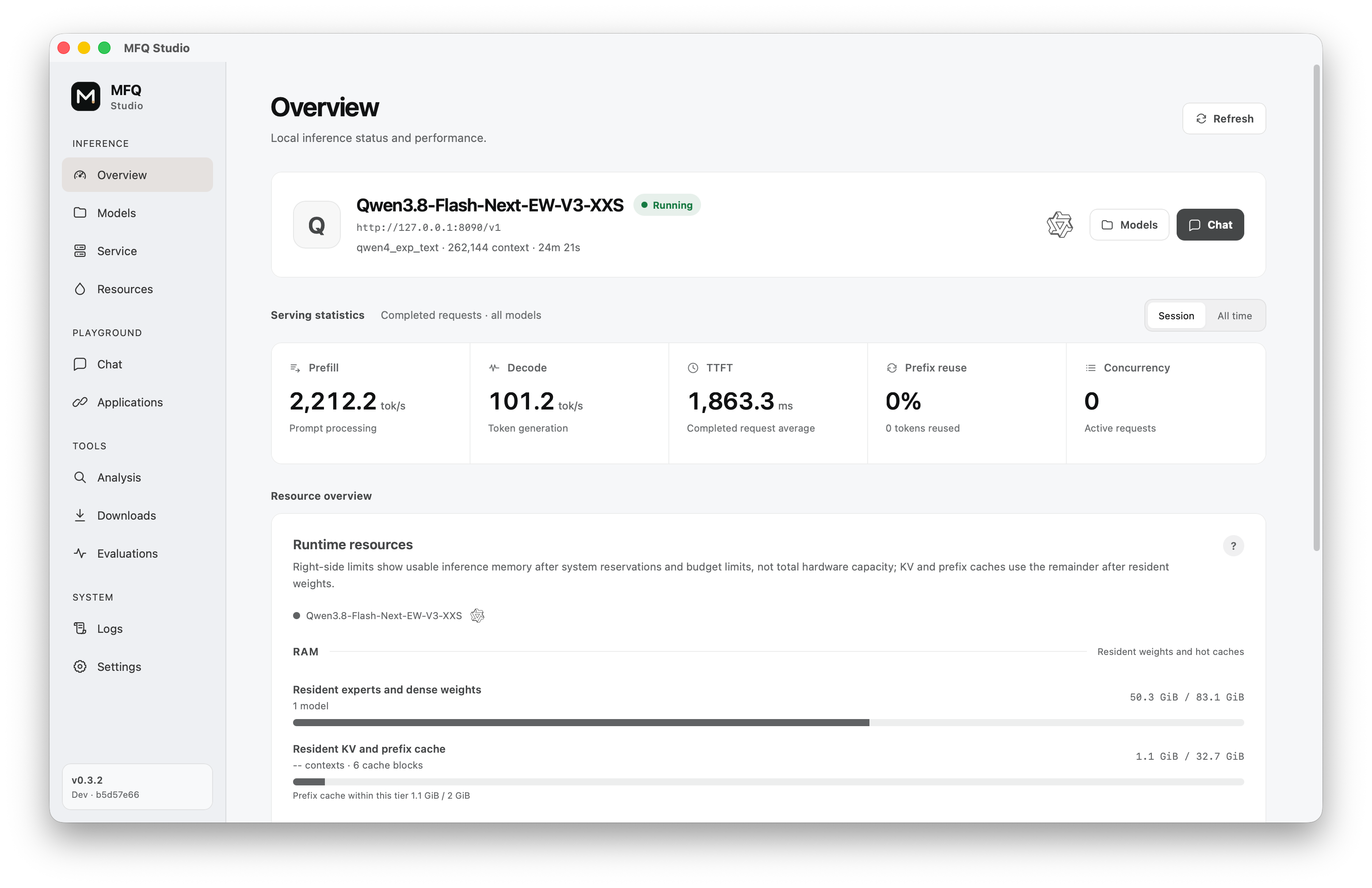
| Apple / Metal generation | 101.2 tok/s | V1-M; M5 Max, 40-core GPU, 128 GB; 4,096-token input; MTP enabled |
| NVIDIA / CUDA generation | 87.0 tok/s | V1-S; RTX 3090 Ti + 32 GiB RAM; 4,096-token input; MTP enabled |
Weight residency excludes KV cache and runtime allocations.
Why MFQ
Preserve quality with fine-grained precision
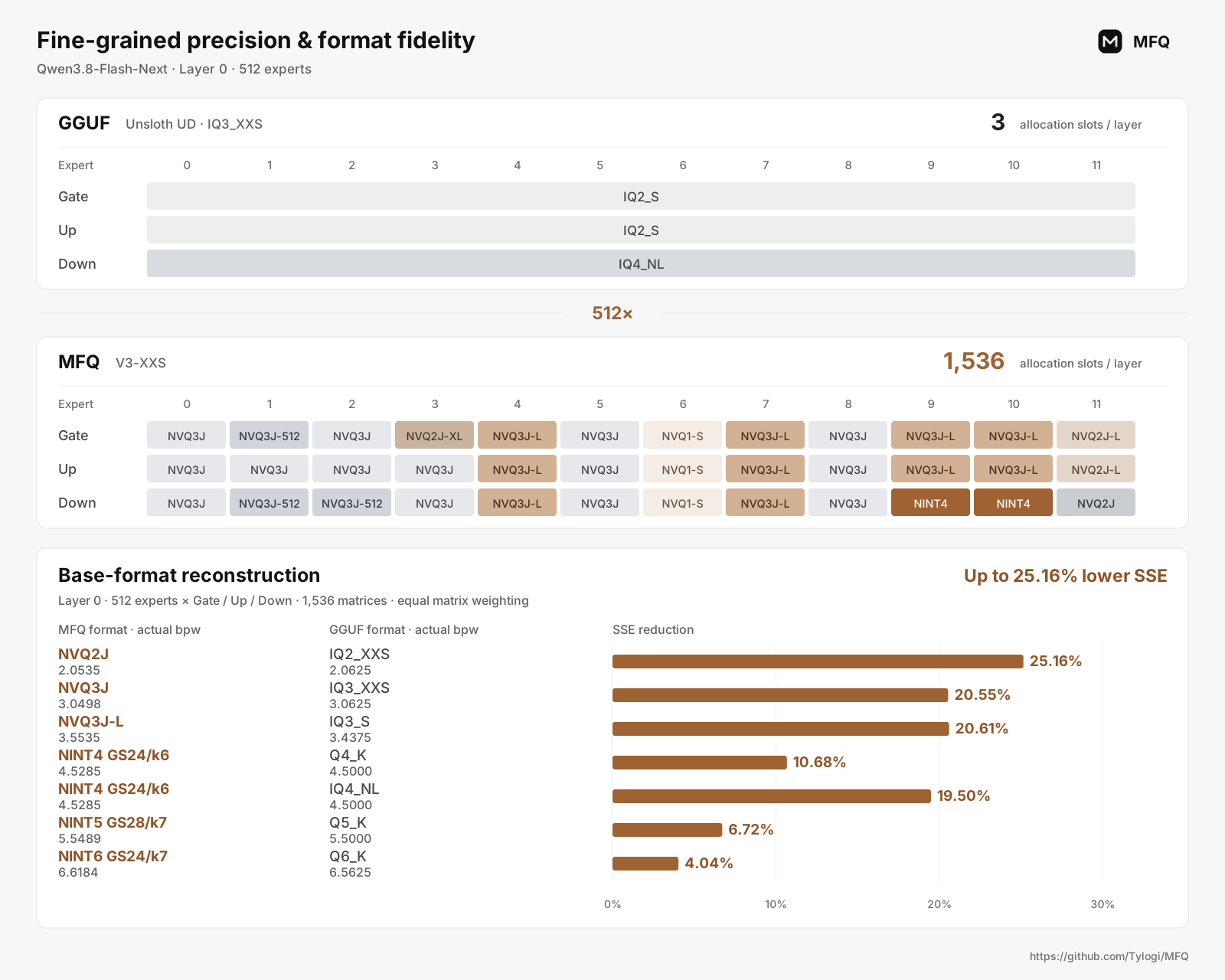
MFQ assigns precision to individual experts, projections, chunks, or neurons, retaining higher precision where the model needs it most. NINT scalar and NVQ vector formats can coexist within the same layer, with independent choices for each expert's Gate, Up and Down projections. The native runtimes execute these mixed formats directly.
MFQ's base formats also reduce reconstruction error. Across the seven listed MFQ/GGUF format pairs, mean SSE is 4.04%–25.16% lower on the tested layer-0 expert matrices.
For Qwen3.8-Flash-Next, the packed expert tensors in the Unsloth UD IQ3_XXS recipe select one GGUF format for each layer's Gate, Up and Down projections. MFQ V3-XXS selects a profile for each expert projection: 1,536 allocation slots per layer, compared with 3 in that recipe (512×).
The calibration method is open source; see Beyond Expert Rankings: Contrast Calibration for Mixed-Precision MoE Quantization.
Fine-grained precision, fast native inference
MFQ's native kernels make this granularity practical by grouping compatible expert work while preserving each projection's selected format. The V3-XXS tier above reaches 105.4 tok/s on M5 Max and 61.0 tok/s on RTX 3090 Ti + 32 GiB RAM, with MTP enabled.
- The Apple Metal backend is built on MLX, with a native C++ runtime and custom Metal kernels for MFQ quantization formats.
- CUDA combines VRAM, system RAM and SSD to run models that exceed GPU memory capacity. Metal supports bounded expert residency and SSD streaming for MoE experts and PLE tables.
- ROCm/HIP support is in development, and optimized CPU backends are planned.
Download, run, and serve from one app
MFQ Studio brings model downloads, loading, memory budgets, quantization inspection and benchmarks into one desktop app. MFQ Server exposes OpenAI- and Anthropic-compatible APIs for applications and agents. It manages multiple models with LRU eviction and stores prefix and KV caches across RAM and SSD. Continuous batching is available on supported native paths.
MiniCPM-o 4.5 support
MFQ ships CUDA C++ and Metal C++ native runtimes for MiniCPM-o 4.5 and publishes quantized checkpoints in S4–S8 multimodal tiers:
| Model | Published precision families | Download |
|---|---|---|
| MiniCPM-o 4.5 | S4–S8 multimodal tiers | ModelScope |
See MiniCPM-o 4.5 multimodal runtime for details.
Quick start
Run a published model with MFQ Studio
- Download MFQ Studio from Releases. The package includes the desktop app, MFQ Server and native runtime.
- Get a model from Downloads, then load it from Models. You can also open an existing local
.mfqcheckpoint. - Use the loaded model locally or connect an application through the compatible APIs. No source build is needed.
Build from source
MFQ requires Git, uv, CMake 3.26+, and a C++ toolchain. Use CUDA 12+ on NVIDIA systems or Metal on Apple silicon. On Apple silicon, replace uv sync below with uv sync --extra metal.
git clone https://github.com/Tylogi/MFQ.git MFQ
cd MFQ

uv sync
uv run mfq build --backend auto
uv run mfq serve
Open http://127.0.0.1:8090/ to load a model.
Quantize your own model
For an HF Safetensors checkpoint, start with the S4-M mixed-precision preset. It keeps sensitive tensors at higher precision and leaves vision and MTP components at source precision by default.
# On Apple silicon, use: uv sync --extra metal --extra train
uv sync --extra train

# Hugging Face safetensors -> self-contained MFQ
uv run mfq quantize \
  /models/Qwen3.8-27B \
  /models/Qwen3.8-27B-MFQ-S4-M.mfq \
  --preset S4-M \
  --backend auto

# Load and serve the quantized model
uv run mfq serve \
  --model /models/Qwen3.8-27B-MFQ-S4-M.mfq \
  --context-size 32768
The quantizer also supports full-precision MFQ and GGUF sources, per-tensor or Expert-Wise precision maps, activation importance matrices, and sharded output.
Links
- GitHub: Tylogi/MFQ
- MiniCPM-o 4.5 MFQ checkpoints: ModelScope
- Paper: arXiv 2610.20353
Author: Tylogi AI Lab. Licensed under Apache 2.0.