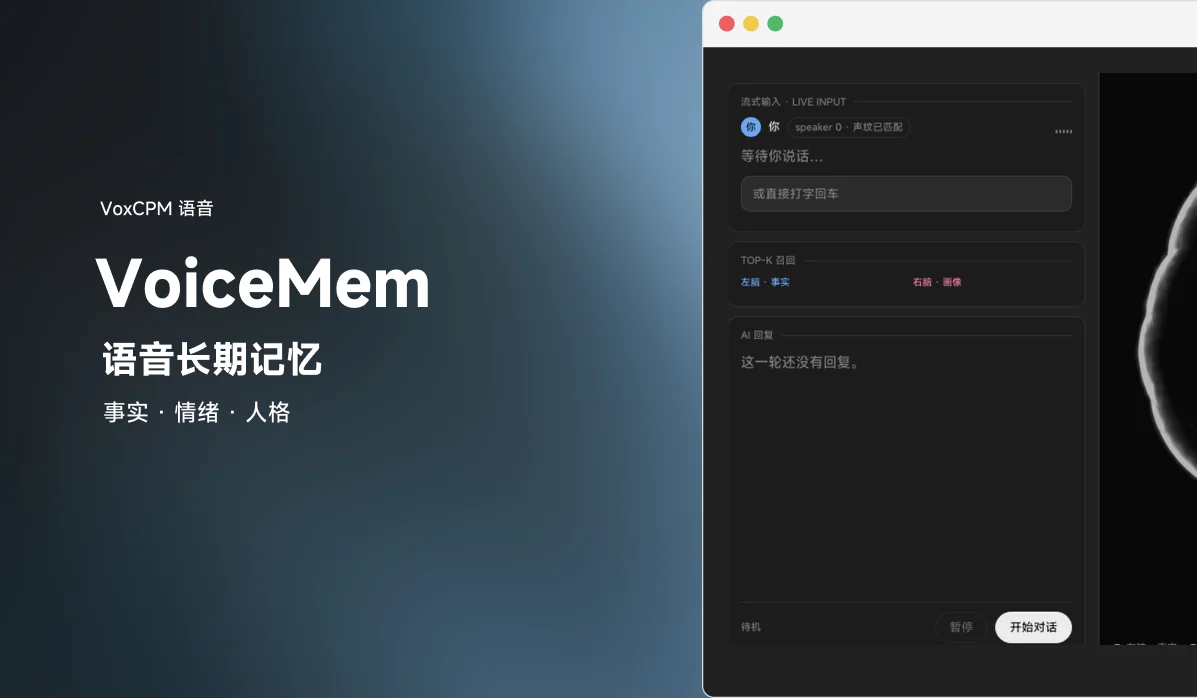
VoiceMem is a memory system for real-time voice agents. Its streaming dual-brain architecture delivers accurate, emotional, personality-aware, low-latency, and low-cost memory. The pluggable speech synthesis layer ships a local VoxCPM2 TTS backend, so the whole listen–remember–reply–speak loop can run fully on-premises.
Introduction
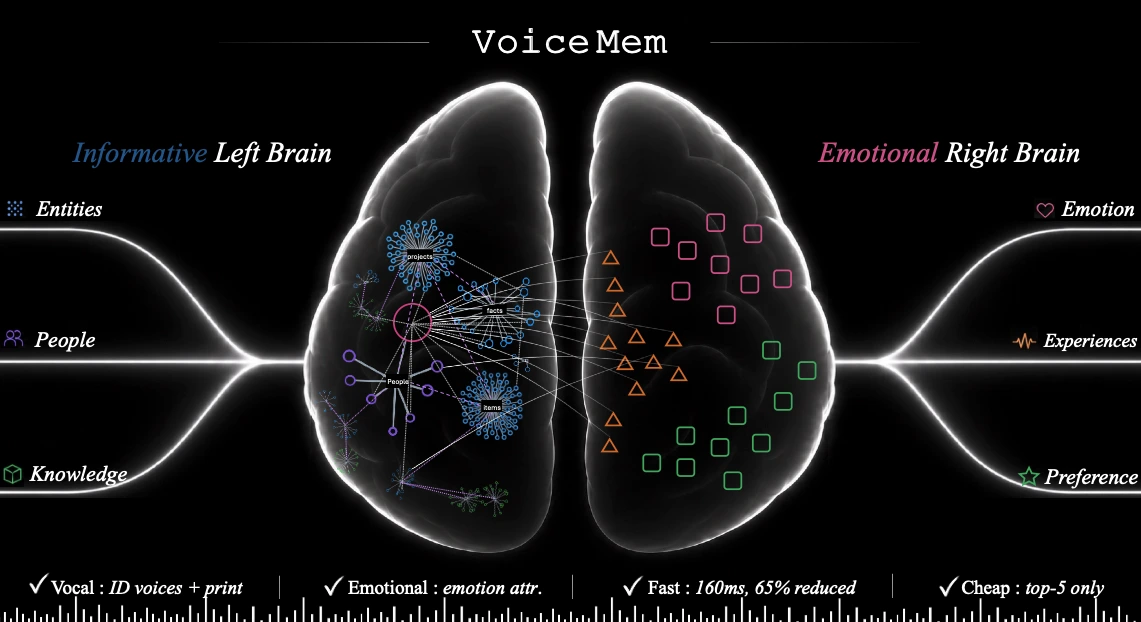
We introduce VoiceMem, adding the final component to voice models: a soul, so they truly come to understand you better over time. VoiceMem is built on a streaming dual-brain architecture and provides accurate, emotional, personality-aware, low-latency, and lowest-cost memory services. This repository will remain fully open source, permanently.
A quick overview of VoiceMem:
- Left Brain: Directly manages factual information and sustains Mem0's full performance under a Top-3 memory limit.
- Right Brain: Manages emotional intelligence through short-term and long-term emotional attribution, including cross-entity nodes and joint maintenance with Left Brain information.
- Low Latency: Uses information compression, hierarchical storage, and streaming retrieval with 0–300 ms speculative prefetching, adding almost no extra latency.
- Simple and Practical: Each query uses about 300 tokens. The architecture is fully decoupled, and every component, including the underlying memory engine, can be replaced.
Demo video: GitHub Demo
Quick Start
Installation
Prerequisite: Python 3.10+
git clone https://github.com/xzf-thu/VoiceMem.git
cd VoiceMem

# Install the memory system (bundles ASR / speaker ID / scene / emotion / local embedding)
pip install voicemem

# Optional: run our fine-tuned Qwen reply model
pip install "voicemem[slm]"
Required Model Download
pip install -U huggingface_hub

hf download zhifeixie/VoiceMem_Default_Models_Env --local-dir ./models
Run as an Offline Memory Engine
from voicemem import VoiceMem

vm = VoiceMem(
    mode="normal",
    openai_key="api_xxx",
    top_k=5,
)

# Local models load lazily -- warm them up so the first call doesn't pay for it.
vm.warmup()

# Store an audio file.
# VoiceMem internally runs ASR / speaker ID / scene / emotion / embedding extraction.
print("ingest start")
vm.ingest(audio="assets/input.wav")  # I am vegetarian and allergic to nuts.
print("ingest done")

# Writing is slow because it extracts facts, tags them and builds the graph.
# Reading is a pure vector lookup -- independent of write cost.
print("search start")
result = vm.search("What are my dietary restrictions?")
print("search done")

print(result.result_leftbrain, result.result_rightbrain)


# Store Left Brain factual text directly (no emotional information).
vm = VoiceMem(
    mode="leftbrain_only",
    openai_key="api_xxx",
    top_k=5,
)

vm.ingest("I am vegetarian and allergic to nuts.")

result = vm.search("What are my dietary restrictions?")
Run VoiceMem in Streaming Mode
Think of VoiceMem's streaming interface as a VAD interface that continuously processes audio.
The example below stores one fact explicitly, then feeds a question as audio to show how the memory is already retrieved before the speaker finishes. It ends, as always, with the ingest decision.
import asyncio
import os
from pprint import pprint

import numpy as np
import soundfile as sf

from voicemem import VoiceMem

# Reuses the vm above; building one here so the block runs standalone
vm = VoiceMem(mode="normal", openai_key=os.environ["OPENAI_API_KEY"], top_k=5)

# Local models load lazily -- warm them up so the first audio chunk doesn't wait
vm.warmup()

# Store one fact first, so the question below has something to find
vm.ingest("I am vegetarian and allergic to nuts.")

SPEC_MIN_CHARS = 6
searching = False


def on_partial(text):
    """Partial transcripts as they arrive. Long enough = the search already started."""
    global searching
    print(f"\r[partial] {text}", end="", flush=True)
    if not searching and len(text) >= SPEC_MIN_CHARS:
        searching = True
        print("\n[search start] speaker isn't done yet, retrieval already running", flush=True)


async def main():
    # This audio is a question: "What are my dietary restrictions?"
    audio, sr = sf.read("assets/question.wav", dtype="float32")
    pcm = (np.clip(audio, -1, 1) * 32767).astype(np.int16)

    stream = vm.stream(src_rate=sr, vad_threshold=0.5, on_partial=on_partial)
    step = int(sr * .032)

    for i in range(0, len(pcm), step):
        st = await stream.feed(pcm[i:i + step].tobytes())
        if st.state != "turn_over":
            continue

        # VAD confirmed end of turn. Memory was fetched while the user spoke -- just read it
        print("[search end]")
        print("transcript  ", st.transcript)
        print("left brain  ", st.result_leftbrain)
        print("right brain ", st.result_rightbrain)
        pprint({k: getattr(st, k) for k in
                ["speaker_id", "speaker_voiceprint", "emotion",
                 "entity", "schema", "text_embedding"]})

        # Every turn runs the ingest decision
        print("[ingest] LLM deciding whether this is worth storing...", flush=True)
        res = vm.ingest(st.transcript)
        print(f"[ingest] extracted {res['facts_count']} facts -> {res['memory_ids']}")


asyncio.run(main())
Interactive Demo
The demo lives in the repo (the pip package ships the library only), so make sure you have cloned it and are in the repo root.
python web/run.py
Then open http://localhost:8787.
By default, the demo mirrors terminal output (including Python logging and Uvicorn's own logs) to results/logs/voicemem-TIME-PID.log, one timestamped line per record, tagged stdout or stderr. The resolved path is printed at startup. To choose a path or disable file logging:
python web/run.py --log-file results/logs/debug.log
python web/run.py --no-file-log
Reply context combines the current input, turns from this session that are not yet represented by persistent memory, and retrieved memory. Each turn enters an in-memory SessionBuffer first. The asynchronous ingest completion callback removes it only after persistent memory is created. Buffers are isolated by Memory Space and WebSocket session.
Barge-in uses two stages during playback. VAD first pauses playback while preserving the audio queue. An explicit stop command or stable ASR updates confirm cancellation; backchannels, echo, non-text sounds, and isolated syllables resume playback. BARGE_REJECT_SILENCE_MS and BARGE_CANDIDATE_TIMEOUT_MS configure rejection timing.
Both reply modes share a PCM-sample media timeline. The browser AudioWorklet reports actual rendered progress, so interrupted context contains only the heard prefix. TTS providers may return TimedAudioChunk alignment metadata; plain PCM providers use segment duration and an adaptive speech-rate fallback.
Memory with a Streaming Dual-Brain Architecture
Instead of storing every type of memory in a single retrieval database, VoiceMem separates memory into two complementary parts:
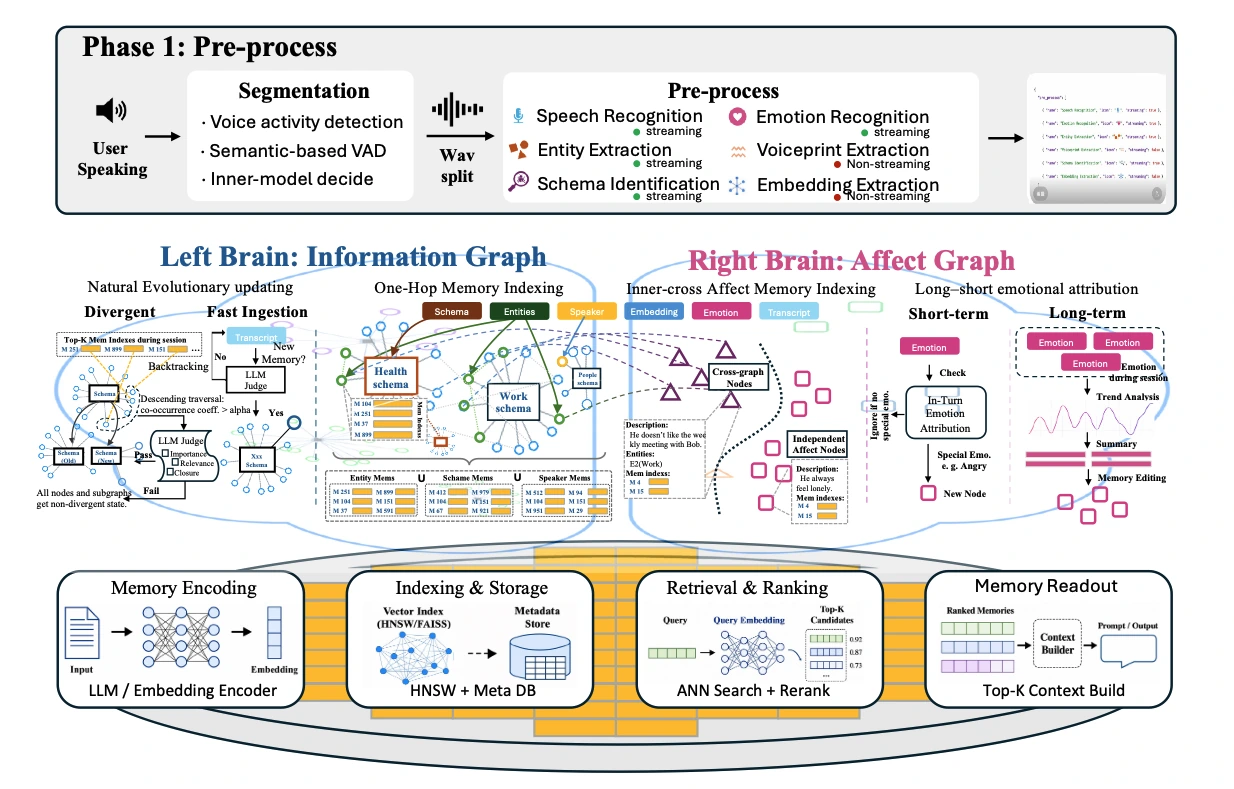
- Left Brain organizes factual memory using schemas and entities for more accurate retrieval.
- Right Brain manages personality, emotion, and relationships using independent and cross-entity memory nodes.
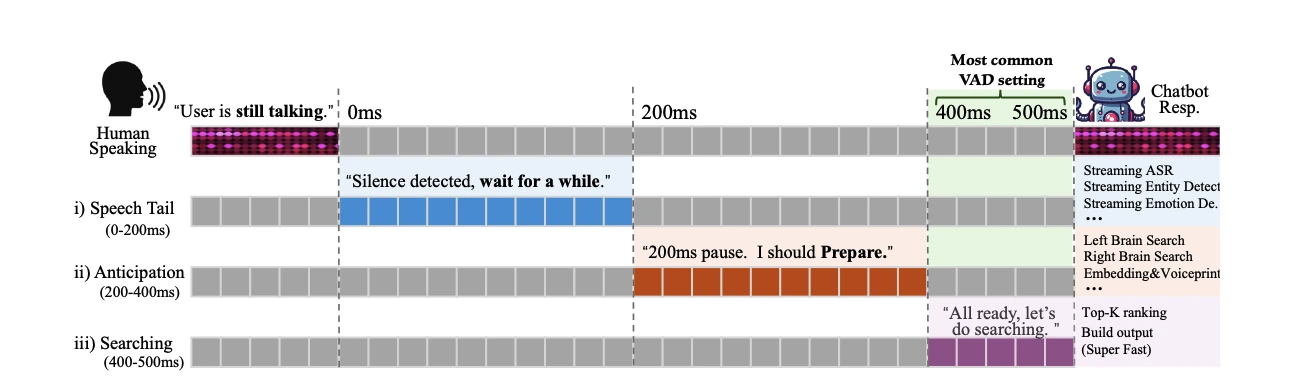
The entire pipeline is streaming. While the user is still speaking, VoiceMem continuously segments audio, transcribes speech, extracts useful memories, and writes structured information into the memory graph.
At query time, VoiceMem routes first, ranks second, and injects only the Top-K memories into the model context. This keeps the context small while preserving the most relevant information.
Key Features
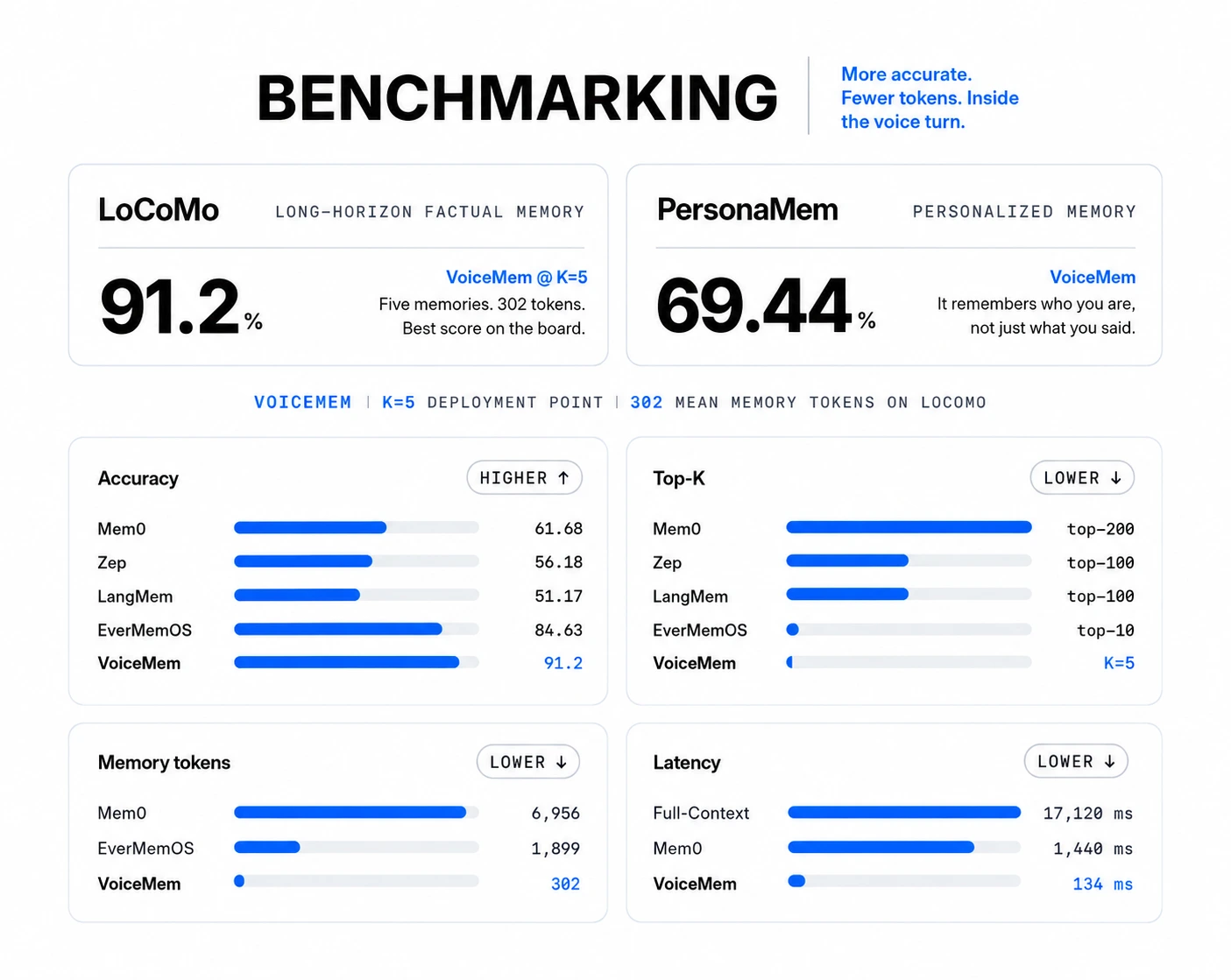
- Accurate: Reaches 91.2% on LoCoMo, compared with 61.68% for Mem0, using only Top-5 memories.
- Emotional & Personal: Remembers not only what the user said, but also who the user is and how they feel. Reaches 69.44% on PersonaMem.
- Multimodal: Remembers speech, speakers, sound events, multi-speaker conversations, and music from real-world audio.
- Fast: Responds in 134 ms, compared with 1,440 ms for Mem0, with streaming retrieval inside the voice turn.
- Low Token Usage: Uses only 430 memory tokens, compared with 6,956 for Mem0 and 1,899 for EverMemOS.
VoxCPM2 as the Local Speech Synthesizer
VoiceMem v0.0.2 opened up a pluggable speech synthesis layer. The README body does not describe it separately, but the repository code (voicemem/tts.py) ships a built-in VoxCPMTTS backend that loads openbmb/VoxCPM2 by default. Install voxcpm and enable it through config:
pip install voxcpm
{"tts": {"provider": "voxcpm"}}
The repository example examples/04_all_local_l40s.py shows a fully local setup on a single L40S: vLLM serves Qwen3-8B as the reply model, while VoxCPM2 handles speech synthesis (about 5 GB of VRAM, first audio from 0.5 s).
VoiceMem Model Families
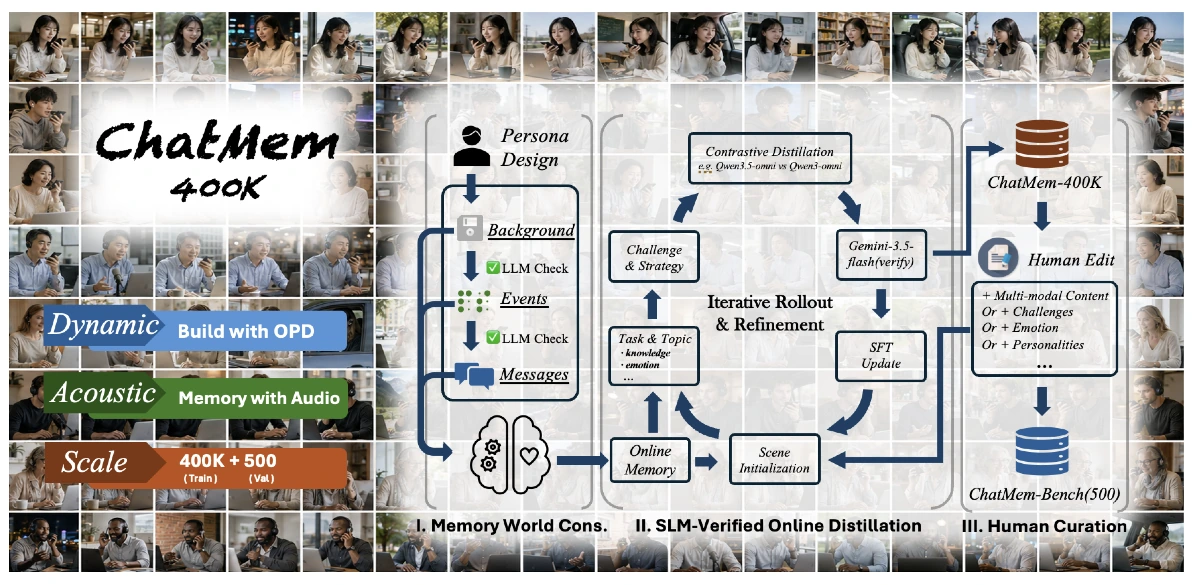
We built ChatMem-400K through a three-stage OPD training pipeline:
- Memory-world construction
- SLM-validated online on-policy distillation (OPD)
- Human refinement
After human editing, the same pipeline produces ChatMem-Bench, which evaluates whether a voice model can build a long-term understanding of the user over time.
The open-source VoiceMem model family includes Qwen2.5-Omni, Qwen3-Omni, and Step-Audio2-Mini. These models can receive and understand memory information provided by VoiceMem during conversations.
Customize Your Voice Agent with VoiceMem
You can integrate VoiceMem with your own voice model to build a real-time voice agent with long-term memory. The basic flow is:
microphone → VoiceMem listens and prefetches relevant memories → your model reads those memories and generates a response
export OPENAI_API_KEY=sk-...
# Only used for fact extraction when writing memories.
# Memory retrieval runs entirely locally.

python examples/03_simple_agent_with_voicemem_memory.py
To use your own model, replace the generation step; the memory half stays exactly as is:
def my_reply(text, memory_context):        # a sync function is fine, it runs off-thread
    return my_model.generate(system=memory_context, user=text)

vm = VoiceMem(reply=my_reply)
Finetuning
VoiceMem provides the complete finetuning pipeline for training your own VoiceMem Model Family adapter. The default training configuration matches the one used for the released checkpoint-3318, and running the following command with the default settings reproduces the same adapter:
pip install ms-swift==4.5.2 bitsandbytes

python finetune/train.py --data data/train.jsonl
See finetune/README.md for the training data format, GPU memory requirements, and instructions for using a different base model.
Evaluation
The evaluation pipeline is fully open source and reproducible.
A benchmark can be started with a single command:
export OPENAI_API_KEY=sk-...

# Start with the small example included in the repository
# to make sure everything is set up correctly.
# 2 conversations, 5 questions.
python evaluation/run.py \
    --dataset locomo \
    --data evaluation/examples/locomo_sample.json

# Then run the full dataset.
python evaluation/run.py \
    --dataset locomo \
    --data data/locomo.json
Example result:
LoCoMo: 10 conversations · 152 questions

Score: 139/152 = 91.4%

  multi_hop     88.2%
  temporal      85.7%
  single_hop    95.1%

Median retrieval latency: 12 ms
Median retrieved memory: 298 tokens
Before running a full evaluation, add --inspect to check how the dataset is parsed. This mode does not call the model and does not incur API costs:
python evaluation/run.py \
    --dataset locomo \
    --data data/locomo.json \
    --inspect
During evaluation, the answering model receives only the retrieved memories, not the original conversation history. If the model receives the full conversation, the benchmark becomes a reading-comprehension test rather than an evaluation of the memory system itself. Adding a benchmark only requires one file and two functions; see evaluation/README.md.
Citation
@misc{2608.26005,
  author = {Zhifei Xie and Jiaqi Lang and Ze An and Yifan Zhao and Dongchao Yang and Kai Li and Ziyang Ma and Mingbao Lin and Chunyan Miao and Shuicheng Yan},
  title = {{V}oice{M}em: {S}treaming {D}ual-{B}rain {M}emory for {R}eal-{T}ime {I}nteraction},
  year = {2026},
  eprint = {2608.26005},
  note = {arXiv:2608.26005v1}
}
Acknowledgements
VoiceMem thanks mem0 (vector memory engine), FunASR (streaming ASR with paraformer-zh-streaming), sherpa-onnx (Silero VAD, 3D-Speaker speaker verification, and fallback streaming ASR), and intfloat/multilingual-e5 (local embeddings and slot classification).
License: Apache License 2.0.
Links
- GitHub: xzf-thu/VoiceMem
- Project page: xzf-thu.github.io/VoiceMem
- Technical report: arXiv 2608.26005
- Models & data: VoiceMem Utils · VoiceMem Model Families · ChatMem-400K
Thanks to Zhifei Xie (@xzf-thu) and the team for open-sourcing this work!