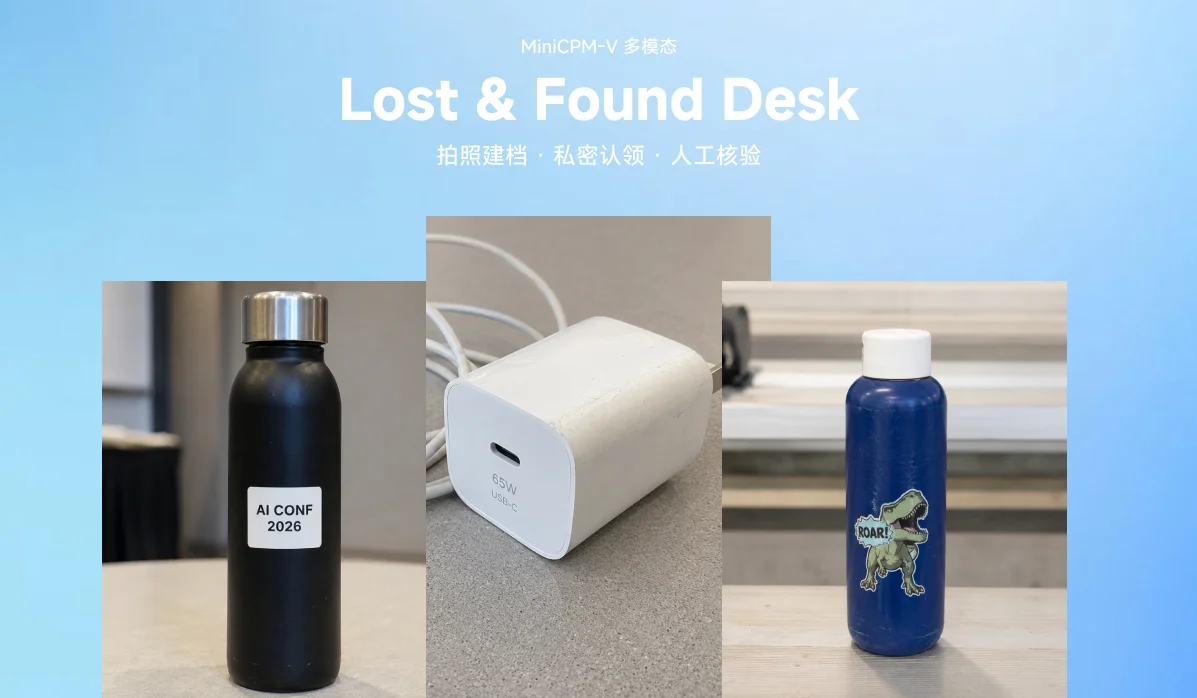
Lost & Found Desk is a caption-first return desk: MiniCPM-V 4.6 writes a searchable caption for every found item, MiniCPM5-1B handles claimant intake, candidate matching and safe message drafting, and ownership is always confirmed by staff offline.
Problem and Scope
Conferences, gyms, schools, coworking spaces and community events all accumulate the same objects: bottles, chargers, badges, bags, jackets, keys and small personal accessories. The work is ordinary, but it is also time-sensitive and privacy-sensitive. A claimant may say only "I lost a black bottle near room B," while staff may have dozens of visually similar objects to review.
Lost-and-found work has two sources of friction:
- Information quality: claimants often remember partial details, and staff often record found items under pressure.
- Information exposure: a system that reveals inventory photos or candidate matches can teach a dishonest claimant what to say.
A useful design therefore needs to make the inventory searchable for staff while keeping candidate evidence out of the public claim flow. The project focuses on small and medium event inventories, where one staff member can photograph items one at a time and the main bottleneck is comparison, not warehouse-scale indexing.
Design Claim
The central design claim is that caption-first intake is a practical unit of work for lost-and-found operations. One item photo produces one item record. The caption becomes a bridge between visual evidence, multilingual owner descriptions, staff review and later reporting. This removes the need for a brittle object-segmentation step and gives staff a record they can read, search and correct.
The system follows three principles:
- One item, one record. Staff photograph each object separately, so the inventory aligns with how returns are actually handled.
- Private claimant intake. Claimants describe their item and may upload a reference photo, while inventory photos, ranked candidates and staff reasoning remain private.
- Staff-controlled handoff. Model outputs support comparison and message drafting; staff confirm identity and record the return offline.
The app deliberately does not segment table photos, run a separate OCR pipeline, expose item photos or ranked candidates to claimants, or let AI decide ownership.
User Experience
Staff workflow. Staff create an event desk; the app generates a public claim link and a staff password. Staff add found items by uploading one photo per object, with optional context such as location or notes. MiniCPM-V produces a caption, plus a privacy note when visible identifying text appears. The item enters a private event inventory.
Claimant workflow. A short conversation. The assistant asks for missing categories of information such as color, location, distinctive marks or supporting photos. Its questions stay at the category level until the claimant supplies specific details. A claimant can resume the conversation through a private link, and staff can reply while the inventory remains private.
Staff review. Staff see the claim summary, conversation, claimant photo captions, candidate items, match reasons and a safe draft message. A return is logged only after staff confirm the item offline.
The core workflow:
- One item photo
- MiniCPM-V caption
- Item inventory
- Claim Assistant conversation
- MiniCPM5 prompt-packed inventory search
- Staff-only match review
- Safe draft message
- Offline handoff log
Multi-Event Model and Roles
Anyone can create an independent help desk for their own event and gets a short event code plus an auto-generated staff password (shown once, stored only as a salted PBKDF2 hash). Each event has three fully separated surfaces, so claimants and staff never share a screen:
| Route | Surface |
|---|---|
/ | Home: create an event, or enter an existing one |
/e/{event_id} | Public claim: start or resume a lost-item report |
/e/{event_id}/c/{id} | A specific report (the resume link) |
/e/{event_id}/staff | Staff console, password-gated per event |
The staff console has Overview, Add items, Claims (Inbox + Match) and Report tabs.
Technical Approach
Lost & Found Desk is deployed as a Gradio Server app with a compiled Svelte interface. The backend provides event, claim, upload, staff-auth, reporting and model services. On Hugging Face ZeroGPU, model-heavy actions run through Gradio API routes so the runtime can schedule GPU work correctly.
The model stack is intentionally small, and every model is below the Build Small 32B cap:
| Model | Role |
|---|---|
openbmb/MiniCPM-V-4.6 | Captions found-item photos and claimant reference photos |
openbmb/MiniCPM5-1B | Claimant intake, staff-side comparison, safe message drafting |
nvidia/llama-nemotron-embed-vl-1b-v2 | Multilingual vision-language retrieval signals for larger inventories |
Model-Driven, Inventory-Guided Claim Conversation
In real mode the English collecting-phase replies are generated by MiniCPM5: the assistant acknowledges what the claimant said and asks the next useful question in its own words. The model never sees the inventory; it only receives the dialogue plus a per-turn hint from a deterministic, inventory-aware planner.
The planner looks at which unclaimed items the current description could match and works out the attribute that best tells those candidates apart and that the claimant hasn't given yet — so the questions are guided by the live inventory, never a fixed script, while leaking nothing (a hint like "still missing: color" is generic). If the inventory has a black bottle and a blue bottle and the claimant only said "a bottle", color is the next question.
Guardrails around the 1B model:
- Replies claiming inventory state ("the desk has nothing") are rejected
- Verbatim repeats of an earlier reply are rejected
- Inventory probes ("what do you have?") never reach the model; they get a fixed safe refusal plus the next question
- Traditional-Chinese conversations use the planner's native-quality phrasing end to end (MiniCPM5-1B's zh chat output proved unshippable: broken sentences and Simplified drift)
Matching runs continuously during the conversation. Candidates are stored on the claim so staff see them automatically, and they are stripped from the claimant-facing payload.
Scaling Matching with Embeddings (Retrieve-then-Rerank)
Packing every caption into the matching prompt does not scale. When an event's unclaimed inventory exceeds LFD_MATCH_TOPK (default 10), matching first narrows to the top-N by embedding similarity to the claimant's description, then runs the LLM ranker on that shortlist only:
- At intake, each item is embedded with
nvidia/llama-nemotron-embed-vl-1b-v2(photo + caption, 2048-d) and the vector is stored per event, never shipped to the frontend - At match time the claimant's description is embedded as a text query in the same space. Because the space is multilingual and cross-modal, a Chinese description can retrieve an English-captioned item
- Small events (at or below
LFD_MATCH_TOPK) are unaffected and pay no embedding cost
Privacy and Safety Boundary
The project treats a claim as a private capability link: a claim_id is a high-entropy (~144-bit) token, and knowing the event code plus claim ID grants access to that claim's conversation, contact info and photos, so the resume URL is not public content. Staff item photos are served through staff-only routes, not as public static files.
The claimant assistant is also constrained by an information boundary. It may ask open-ended questions about missing evidence, such as whether the item had a sticker, logo, label, scratch or other distinctive mark, but it should not introduce a specific detail from the private inventory before the claimant has mentioned it.
Safety rules:
- Claimants cannot browse item photos or see ranked candidates
- The app never says "this is yours"
- Staff must confirm handoff offline
- Visible identifying text is not transcribed into public traces
- Returned items are removed from candidate search
- Confirmation messages ask for details, not ownership
The backend is also instrumented with OpenTelemetry (traces, metrics and trace-correlated logs); every model op records its mode and outcome (success / fallback / error), so there is no silent degradation.
Development and Codex
Codex helped move the project from prototype to a submission-ready release: aligning the official requirements, README metadata, deployment links, strict real-model defaults, ZeroGPU startup behavior and dependency compatibility with the current Spaces builder, and producing the article draft and submission notes. Its most useful role was convergence — making failure states explicit, documenting model/runtime choices, verifying public links, and keeping GitHub, the Space, the demo video and the article consistent.
Run Locally
uv sync
uv run python app.py
Open http://localhost:7860. On Mac with MPS:
PYTORCH_ENABLE_MPS_FALLBACK=1 LFD_DEVICE=mps uv run python app.py
A demo event is seeded on first boot: event code demo, staff password demo-pass, staff console at /e/demo/staff.
Links
- Live demo: Hugging Face Space
- Demo video: YouTube
- Blog post: Lost & Found Desk: small models for staff-controlled item return
- Code: JacobLinCool/Lost-n-Found-Desk
- Author: Jacob Lin (@JacobLinCool)