MiniCPM-V 4.5
MiniCPM-V Multimodal Series
Start from a single image and one question to get your first response, then move on to multi-image comparison, video understanding, OCR, PDF parsing and visual grounding. Pick the example that matches your task and build your multimodal app from there.
MiniCPM-V 4.5 ships as a single checkpoint and switches between non-thinking and thinking modes via the enable_thinking argument of model.chat(): non-thinking answers directly with lower latency, while thinking reasons first and suits multi-step questions. The "single-image / multi-image (think)" sections below are the latter.
Models are loaded with AutoModel.from_pretrained(..., trust_remote_code=True). Use sdpa or flash_attention_2 for the attention implementation — do not use eager.
Single-image QA
Initialize model
from PIL import Image
import torch
from transformers import AutoModel, AutoTokenizer

model_path = 'openbmb/MiniCPM-V-4_5'
model = AutoModel.from_pretrained(model_path, trust_remote_code=True,
                                  # sdpa or flash_attention_2, no eager
                                  attn_implementation='sdpa', torch_dtype=torch.bfloat16)
model = model.eval().cuda()
tokenizer = AutoTokenizer.from_pretrained(
    model_path, trust_remote_code=True)
Chat with single image
image = Image.open('./assets/single.png').convert('RGB')

# First round chat
question = "What is the landform in the picture?"
msgs = [{'role': 'user', 'content': [image, question]}]

answer = model.chat(
    msgs=msgs,
    image=image,
    tokenizer=tokenizer
)
print(answer)
Second round chat
# Second round chat, pass history context of multi-turn conversation
msgs.append({"role": "assistant", "content": [answer]})
msgs.append({"role": "user", "content": [
            "What should I pay attention to when traveling here?"]})

answer = model.chat(
    msgs=msgs,
    image=None,
    tokenizer=tokenizer
)
print(answer)
Sample Image
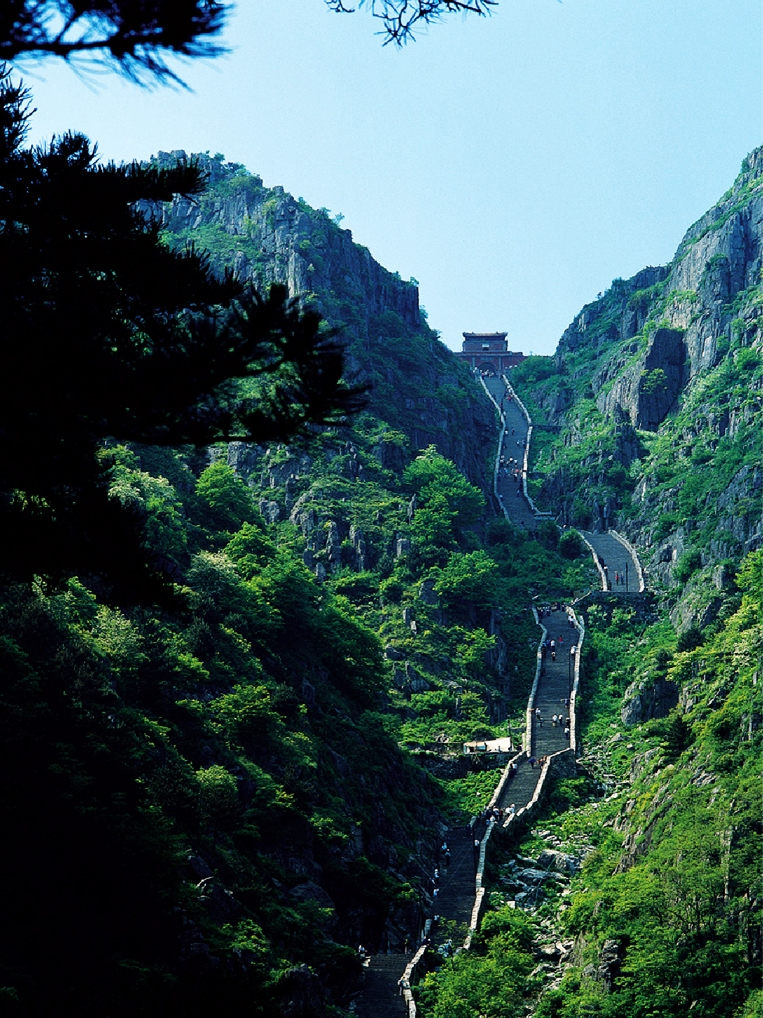
Example Output
First round
The landform in the picture is a mountain range. The image shows steep cliffs, rugged terrain, and a winding path that ascends between two prominent rocky peaks covered with green vegetation. This type of landscape features high elevations and dramatic slopes characteristic of mountains.
Second round
When traveling to a mountainous area like this, it's important to pay attention to several factors. Firstly, be mindful of the steep paths and uneven terrain; wear appropriate footwear with good grip for safety. Secondly, stay hydrated as high altitudes can lead to dehydration more quickly than at sea level. Thirdly, check weather conditions before your trip since mountains can have sudden changes in weather which might affect visibility and trail conditions. Lastly, if you plan to hike or climb, carry essential supplies such as food, water, first aid kits, and navigation tools (maps or GPS) because help may not be readily available on remote trails.
Multi-image QA
Initialize model
from PIL import Image
import torch
from transformers import AutoModel, AutoTokenizer

model_path = 'openbmb/MiniCPM-V-4_5'
model = AutoModel.from_pretrained(model_path, trust_remote_code=True,
                                  attn_implementation='sdpa', torch_dtype=torch.bfloat16)  # sdpa or flash_attention_2, no eager
model = model.eval().cuda()
tokenizer = AutoTokenizer.from_pretrained(
    model_path, trust_remote_code=True)
Chat with multiple images
image1 = Image.open('assets/multi1.png').convert('RGB')
image2 = Image.open('assets/multi2.png').convert('RGB')
question = 'Compare the two images, tell me about the differences between them.'

msgs = [{'role': 'user', 'content': [image1, image2, question]}]

answer = model.chat(
    image=None,
    msgs=msgs,
    tokenizer=tokenizer
)
print(answer)
Sample Images
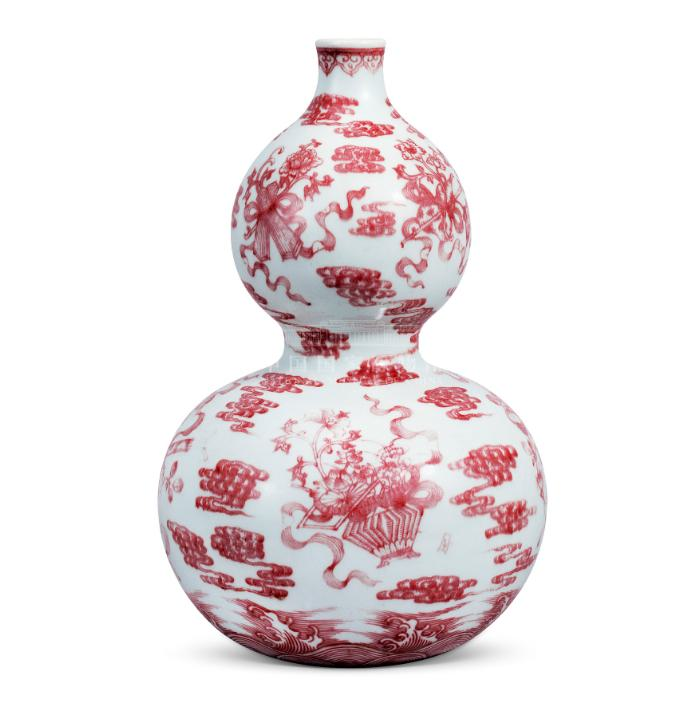
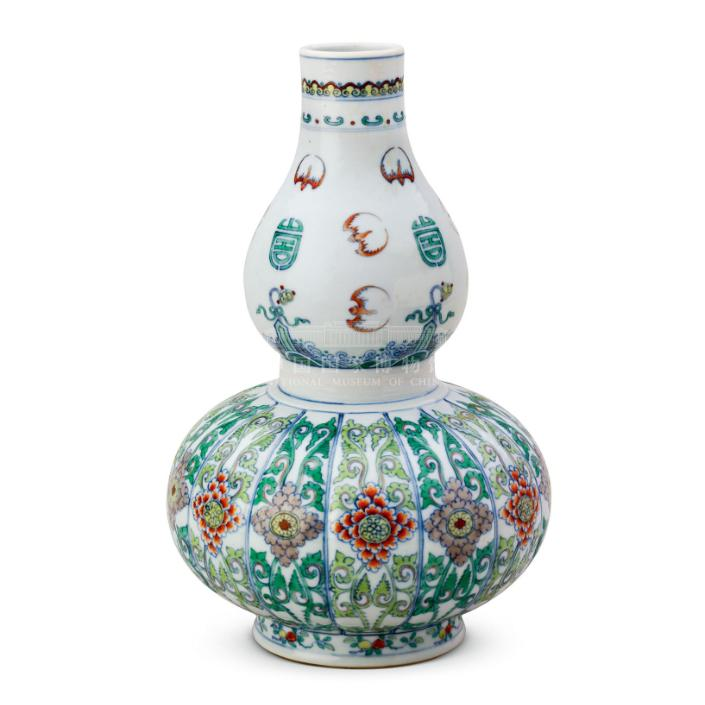
Example Output
The vases have different shapes, with the first being rounder and more bulbous. The patterns on the vases are also distinct: the first vase has red designs against a white background, while the second features green and blue floral motifs. Additionally, the neck of the first vase is narrower than that of the second one.
Video QA
Initialize model
from PIL import Image
from transformers import AutoModel, AutoTokenizer
import torch

model_path = 'openbmb/MiniCPM-V-4_5'
model = AutoModel.from_pretrained(
    model_path,
    trust_remote_code=True,
    attn_implementation='sdpa',  # sdpa or flash_attention_2
    torch_dtype=torch.bfloat16,
)
model = model.eval().cuda()
tokenizer = AutoTokenizer.from_pretrained(
    model_path, trust_remote_code=True)
Video encode function
from decord import VideoReader, cpu

MAX_NUM_FRAMES = 64  # if cuda OOM set a smaller number


def encode_video(video_path):
    def uniform_sample(l, n):
        gap = len(l) / n
        idxs = [int(i * gap + gap / 2) for i in range(n)]
        return [l[i] for i in idxs]

    vr = VideoReader(video_path, ctx=cpu(0))
    sample_fps = round(vr.get_avg_fps() / 1)  # FPS
    frame_idx = [i for i in range(0, len(vr), sample_fps)]
    if len(frame_idx) > MAX_NUM_FRAMES:
        frame_idx = uniform_sample(frame_idx, MAX_NUM_FRAMES)
    frames = vr.get_batch(frame_idx).asnumpy()
    frames = [Image.fromarray(v.astype('uint8')) for v in frames]
    print('num frames:', len(frames))
    return frames
Chat with video
video_path = "assets/badminton.mp4"
frames = encode_video(video_path)
question = "Describe the video"
msg = [
    {'role': 'user', 'content': frames + [question]},
]

# Set decode params for video
params = {}
params["use_image_id"] = False
# use 1 if cuda OOM and video resolution > 448*448
params["max_slice_nums"] = 2

res = model.chat(
    image=None,
    msgs=msg,
    tokenizer=tokenizer,
    **params
)

print("Response:")
print(res)
Example Output
num frames: 21
Response:
The video captures a dynamic badminton match between two skilled players, one in yellow and the other in red. The game takes place on an indoor court with green flooring and white lines marking its boundaries. Throughout the footage, we see both athletes displaying impressive footwork as they move swiftly across the playing area to return shots.

At various points, the player wearing yellow is seen executing powerful smashes from different locations around the court, including near the net where he successfully hits his opponent out of bounds twice. In response, the competitor dressed in red demonstrates agility by diving repeatedly onto the floor after failing to retrieve these low shots made close to the ground or driven straight towards him at high speed.

As their rally progresses, each participant showcases quick reflexes and strategic positioning during exchanges that span diagonally across multiple corners while maintaining control over ball placement along sidelines marked by distinct pink borders surrounding them. Their movements are fluid yet intense – reflecting competitive spirit typical for professional sports events like this one which appears staged indoors under artificial lighting conditions visible through overhead fixtures illuminating entire venue space filled with spectators seated behind protective glass panels separating audience members safely away from actual play zone itself (which could be either clay or hard surface based on visual cues).
Single-image (think)
Initialize think model
from PIL import Image
import torch
from transformers import AutoModel, AutoTokenizer

model_path = 'openbmb/MiniCPM-V-4_5'
model = AutoModel.from_pretrained(model_path, trust_remote_code=True,
                                  # sdpa or flash_attention_2, no eager
                                  attn_implementation='sdpa', torch_dtype=torch.bfloat16)
model = model.eval().cuda()
tokenizer = AutoTokenizer.from_pretrained(
    model_path, trust_remote_code=True)
Chat with single image
image = Image.open('./assets/single.png').convert('RGB')

# First round chat
question = "What is the landform in the picture?"
msgs = [{'role': 'user', 'content': [image, question]}]

# chat with thinking enabled
answer = model.chat(
    msgs=msgs,
    image=image,
    tokenizer=tokenizer,
    enable_thinking=True
)
print(answer)
Second round chat
# Second round chat, pass history context of multi-turn conversation
msgs.append({"role": "assistant", "content": [answer]})
msgs.append({"role": "user", "content": [
            "What should I pay attention to when traveling here?"]})

answer = model.chat(
    msgs=msgs,
    image=None,
    tokenizer=tokenizer,
    enable_thinking=True
)
print(answer)
Sample Image
Example Output
First round
<think>
So, let me analyze the image. The scene shows a long stone staircase winding through lush green mountains, with a pavilion at the top. This looks like a famous mountain path in China. The architectural style and the mountain path are characteristic of Mount Heng (also known as Songshan), which is part of the Hunan province. Wait, or maybe Mount Tai? No, Mount Heng's paths are known for steep steps. Wait, the image might be of the "Heng Mountain's ancient paths" or similar. Wait, the structure at the top is a pavilion, and the winding path through the mountains with such greenery... Let me think. Mount Heng (Hengshan) is one of the Five Sacred Mountains of China, and it has famous ancient paths. Alternatively, maybe Mount Lu? No, the landscape here seems more like Heng Mountain. Wait, the question is asking for the location. Since the image is of a mountain path with traditional Chinese architecture, and the steep steps between mountains, this is likely Mount Heng (Hengshan) in Hunan Province, China. Wait, but I should confirm. Another possibility is Mount Song (Songshan), but Songshan's paths are also steep. Wait, the pavilion at the top—maybe the South Sky Pavilion? Wait, maybe the image is of the "Tianping Steps" or something similar. But given the typical Chinese mountain scenery with such paths, the most famous is Mount Heng. Alternatively, maybe Mount Tai? No, Mount Tai's paths are different. Wait, the greenery and the steep stone steps winding up the mountain suggest this is a well-known sacred mountain path in China. After considering, the location is likely Mount Heng (Hengshan), Hunan Province, China.
</think>

To determine the location, analyze the image: it shows a steep, winding stone path through lush green mountains with traditional Chinese architecture (a pavilion at the top). This landscape is characteristic of Mount Heng (Hengshan), one of China’s Five Sacred Mountains, known for its ancient stone steps and mountainous scenery. Thus, the place is located in Hunan Province, China.
Ultimately, the answer is \boxed{Mount Heng (Hengshan), Hunan Province, China}.
Second round
<think>
So, let's think about what travelers should pay attention to when visiting Mount Heng. First, consider the terrain: the stone steps are steep and may be slippery, so wear comfortable, sturdy shoes and be cautious while climbing. The area is mountainous, so weather can change quickly—bring layers and rain gear. Also, respect local customs and rules, especially around the temples and pavilions. Be prepared for physical exertion since the ascent is long. Maybe also check opening hours and plan accordingly. Plus, the natural beauty is stunning, so allow time to enjoy the scenery.
Ultimately, the answer should cover safety, weather, physical readiness, and cultural respect.
</think>

To determine the location, observe the image’s features: a steep stone pathway winding through lush green mountains, accompanied by traditional Chinese architectural elements (such as a pavilion at the top). This landscape is characteristic of **Mount Heng (Hengshan)**, one of China’s Five Sacred Mountains, renowned for its ancient stone steps and mountainous terrain.

For precautions when traveling here:
- Wear sturdy, comfortable footwear due to the steep, uneven stone steps.
- Prepare for physical exertion, as the ascent is long and challenging.
- Check weather conditions in advance (mountains can have sudden weather changes) and pack appropriate clothing (layers for temperature shifts, rain gear if necessary).
- Respect local customs and the natural environment (e.g., avoid littering, follow rules around temples/pavilions).
- Plan your visit to allow time for the ascent/descent and to appreciate the scenic views.

Ultimately, the answer is \boxed{Mount Heng (Hengshan), Hunan Province, China}.
Multi-image (think)
Initialize model
from PIL import Image
import torch
from transformers import AutoModel, AutoTokenizer

model_path = 'openbmb/MiniCPM-V-4_5'
model = AutoModel.from_pretrained(model_path, trust_remote_code=True,
                                  attn_implementation='sdpa', torch_dtype=torch.bfloat16)  # sdpa or flash_attention_2, no eager
model = model.eval().cuda()
tokenizer = AutoTokenizer.from_pretrained(
    model_path, trust_remote_code=True)
Chat with multiple images
image1 = Image.open('assets/multi1.png').convert('RGB')
image2 = Image.open('assets/multi2.png').convert('RGB')
question = 'Compare the two images, tell me about the differences between them.'
# question = '比较这两张图片,告诉我它们的不同之处。'

msgs = [{'role': 'user', 'content': [image1, image2, question]}]

answer = model.chat(
    image=None,
    msgs=msgs,
    tokenizer=tokenizer,
    enable_thinking=True
)
print(answer)
Second round chat
# Second round chat, pass history context of multi-turn conversation
msgs.append({"role": "assistant", "content": [answer]})
msgs.append({"role": "user", "content": ["Tell me about the similarities between them."]})
# msgs.append({"role": "user", "content": ["告诉我它们的相似之处。"]})
answer = model.chat(
    image=None,
    msgs=msgs,
    tokenizer=tokenizer,
    enable_thinking=True
)
print(answer)
Sample Images
Example Output
English Answer
First Round
<think>
So, let's analyze the two images. First, look at the colors: the first vase (the first image) is red and white, while the second one (the second image) is green, blue, and maybe other colors. Then check the patterns: the first has red cloud-like designs and possibly figures, the second has green floral patterns and different motifs. Also, the shapes might be similar (gourd-shaped) but the decoration styles are different. Wait, the first image's vase has red on white, the second uses green, blue, red, and other colors. The patterns are different too. Let me list the differences:

1. Color scheme: the first image is predominantly red on white, the second is green, blue, and multicolor with floral and geometric patterns.
2. Design patterns: the first has cloud motifs and maybe mythical figures in red, the second has floral designs with green vines, blue borders, and different symbols.
3. Overall style: the first appears to be a classic red-decorated porcelain, the second has a more colorful and possibly multi-colored palette with intricate floral arrangements.
</think>

To compare the two images, we analyze the following differences:

1. **Color Scheme**:
   - The first vase  features a monochromatic red design on a white background.
   - The second vase  uses a multicolored palette, including green, blue, and red, with intricate floral and geometric patterns.

2. **Design Motifs**:
   - The first vase displays red cloud-like patterns and what appears to be a central figure (possibly a mythical or historical character) surrounded by red clouds.
   - The second vase has green vine-like patterns, blue decorative elements, and multicolored floral designs (e.g., red, orange flowers with green leaves) arranged in vertical bands.

3. **Overall Aesthetic Style**:
   - The first vase has a more traditional, single-color red-and-white aesthetic typical of certain classical porcelain styles.
   - The second vase exhibits a vibrant, multi-color decorative style with complex floral and symbolic motifs, reflecting a different artistic tradition.


These differences highlight variations in color, pattern complexity, and design themes between the two vases.
Second Round
<think>
To identify the similarities between the two vases, let's analyze their shared features:

1. **Shape and Form**:
   Both vases have a distinctive double-gourd (or gourd-shaped) silhouette, with a narrower neck and a bulbous, rounded body that tapers into a smaller upper section. This classic gourd shape is a common design element in traditional porcelain.

2. **Material and Finish**:
   Both appear to be made of porcelain, characterized by their smooth, glossy white backgrounds. This indicates a high-quality ceramic material typical of fine Chinese vases.

3. **Decorative Style**:
   Each vase features intricate, hand-painted patterns. The first vase uses a red monochromatic design, while the second uses multiple colors. Despite the difference in color schemes, both vases exhibit detailed, artisanal decoration, showcasing skilled craftsmanship.

4. **Cultural Context**:
   The gourd shape and elaborate painted designs suggest both are influenced by traditional Chinese ceramic art, where such forms and decorative themes are prevalent.

These similarities highlight their shared cultural roots, material quality, and artistic tradition, even as they differ in color and specific motifs.
中文回答
第一轮
<think>
那么,让我们从分析每个花瓶的细节开始。首先看第一个花瓶(the first image):它是一个白色底色的葫芦形花瓶,上面有红色的图案。图案包括人物和云朵,可能还有植物或花卉元素。形状是经典的葫芦形,上下两个球体。

第二个花瓶(the second image):也是葫芦形,但颜色和图案不同。它有绿色、蓝色、红色和橙色的多彩图案。上半部分有绿色图案,带有红色和橙色的圆形元素。下半部分有绿色藤蔓和花卉设计,更复杂。颜色更丰富,图案种类更多。

所以不同点包括:颜色(第一个是单一红色,第二个是多种颜色:绿、蓝、红、橙)、图案主题(第一个有红色人物和云朵,第二个有绿色藤蔓、花卉和不同形状)、整体设计风格(第一个更简洁的红色图案,第二个更多彩且复杂的图案)。
</think>

要比较这两张图片,可以观察以下不同之处:

1. **颜色方案**:第一个花瓶(the first image)主要是白色底色,上面有红色图案。第二个花瓶(the second image)有绿色、蓝色、红色和橙色等多种颜色的图案。

2. **图案设计**:第一个花瓶的图案包括红色的人物、云朵和植物等元素。第二个花瓶的图案包括绿色藤蔓、花卉、几何形状(如圆形)和不同的装饰元素,整体设计更复杂且色彩丰富。

3. **视觉风格**:第一个花瓶的图案更简约、单色(红色在白色上),而第二个花瓶的图案更复杂、多元(多种颜色和更精致的细节)。


简而言之,不同之处在于颜色方案(第一个是红色,第二个是多种颜色)、图案主题(第一个有红色人物/云朵,第二个有绿色藤蔓/花卉/几何形状)以及整体设计风格(第一个更简约,第二个更复杂)。
第二轮
<think>
明白了,让我们找出它们的相似之处。首先,观察两个花瓶的形状。两者的形状都是双球体(gourd-shaped),由一个较细的上部(neck)和一个较宽的底部(bulbous body)组成。颜色方案?等等,第一个是白色底色上有红色图案,第二个是白色底色上有多种颜色的图案,但它们都是白色底色。等等,是形状吗?是的,形状都是“葫芦形”或双球体花瓶。图案的分布方式?两者都有复杂的装饰图案,覆盖了花瓶的表面。材质?看起来都是陶瓷,可能是瓷器。等等,形状:都是gourd-shaped(双球体),一个较细的上部和一个较宽的底部。颜色方面,都是白色底色,但第一个是红色图案,第二个是多种颜色。但它们都具有双球体形状。图案:两者都有装饰图案,覆盖了花瓶的表面。材质:都是陶瓷。总结相似点:都具有双球体(葫芦形)形状,都有装饰图案,材质可能是瓷器(或类似的陶瓷),都是花瓶。让我们再确认一下。形状:两者的形状都是gourd-shaped(双球体),一个较细的上部和一个较宽的底部。颜色:都是白色底色,尽管第一个是红色图案,第二个是多种颜色,但底色都是白色。图案:两者都有复杂的装饰图案,覆盖了花瓶的表面。材质:看起来都是陶瓷(瓷器)。

因此,它们的相似之处:两者都是双球体花瓶(gourd-shaped),都有装饰图案,材质可能是瓷器或类似的陶瓷,形状都具有类似的葫芦形结构,都用于装饰(花瓶)。
</think>

它们的相似之处:
- 形状:两者都是双球体(葫芦形)花瓶,由一个较细的上部和一个较宽的底部组成。
- 材质:都看起来是陶瓷(可能是瓷器),有白色底色。
- 功能:两者都作为装饰花瓶使用。
- 装饰:都具有复杂的表面图案,虽然图案设计和颜色不同,但都覆盖了花瓶的表面。
OCR
Initialize model
from PIL import Image
import torch
from transformers import AutoModel, AutoTokenizer

model_path = 'openbmb/MiniCPM-V-4_5'
model = AutoModel.from_pretrained(model_path, trust_remote_code=True,
                                  attn_implementation='sdpa', torch_dtype=torch.bfloat16)  # sdpa or flash_attention_2, no eager
model = model.eval().cuda()
tokenizer = AutoTokenizer.from_pretrained(
    model_path, trust_remote_code=True)
Usage example
ocr_image = Image.open('./assets/ocr.png').convert('RGB')

question = "What is the text in the picture?"
msgs = [{'role': 'user', 'content': [ocr_image, question]}]

answer = model.chat(
    msgs=msgs,
    image=None,
    tokenizer=tokenizer
)
print(answer)
Sample Image
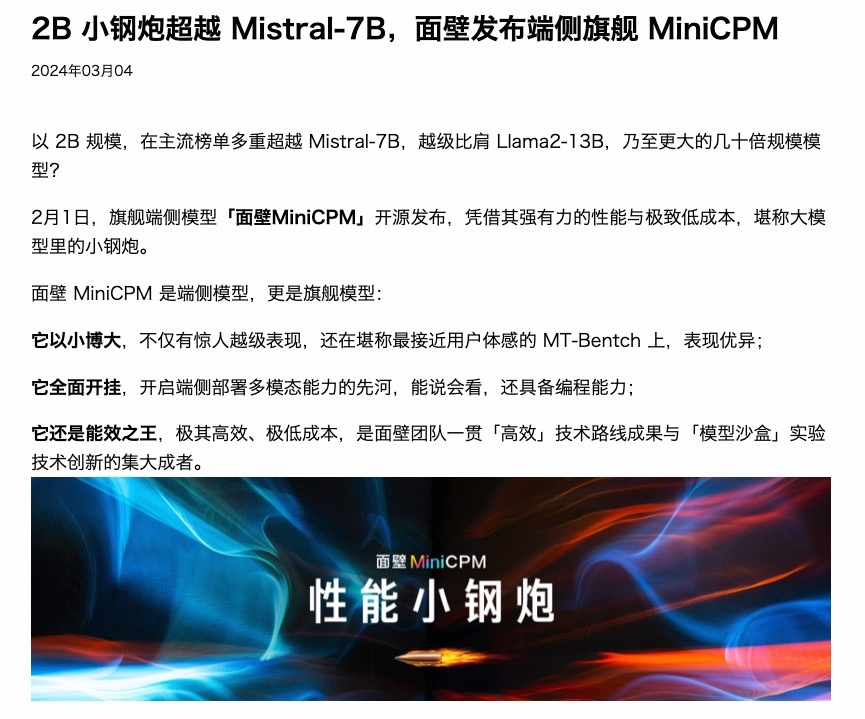
Example Output
2B小钢炮超越 Mistral-7B,面壁发布端侧旗舰 MiniCPM
2024年03月04

以2B规模,在主流榜单多重超越 Mistral-7B,越级比肩 Llama2-13B,乃至更大的几十倍规模模型?

2月1日,旗舰端侧模型「面壁MiniCPM」开源发布,凭借其强有力的性能与极致低成本,堪称大模型里的小钢炮。

面壁 MiniCPM 是端侧模型,更是旗舰模型:

它以小博大,不仅有惊人越级表现,还在堪称最接近用户体感的 MT-Bench 上,表现优异;

它全面开挂,开启端侧部署多模态能力的先河,能说会看,还具备编程能力;

它还是能效之王,极其高效、极低成本,是面壁团队一贯「高效」技术路线成果与「模型沙盒」实验技术创新的集大成者。

面壁 MiniCPM
性能小钢炮
PDF parsing
Initialize model
import torch
from transformers import AutoModel, AutoTokenizer

model_path = 'openbmb/MiniCPM-V-4_5'
model = AutoModel.from_pretrained(model_path, trust_remote_code=True,
                                  attn_implementation='sdpa', torch_dtype=torch.bfloat16)  # sdpa or flash_attention_2, no eager
model = model.eval().cuda()
tokenizer = AutoTokenizer.from_pretrained(
    model_path, trust_remote_code=True)
PDF to image function
#! need to install poppler-utils
# sudo apt-get update
# sudo apt-get install poppler-utils
from pdf2image import convert_from_path


def pdf_to_images(pdf_path, dpi=200):
    images = convert_from_path(pdf_path, dpi=dpi)
    images = [image.convert('RGB') for image in images]
    return images
Usage example
prompt = """
You are an OCR assistant. Your task is to identify and extract all visible text from the image provided. Preserve the original formatting as closely as possible, including:

- Line breaks and paragraphs
- Headings and subheadings
- Any tables, lists, bullet points, or numbered items
- Special characters, spacing, and alignment

Output strictly the extracted text in Markdown format, reflecting the layout and structure of the original image. Do not add commentary, interpretation, or summarization—only return the raw text content with its formatting.
"""

contents = [prompt]
contents.extend(pdf_to_images('assets/parse.pdf'))
msgs = [{'role': 'user', 'content': contents}]

answer = model.chat(msgs=msgs, image=None, tokenizer=tokenizer)
print(answer)
Sample PDF
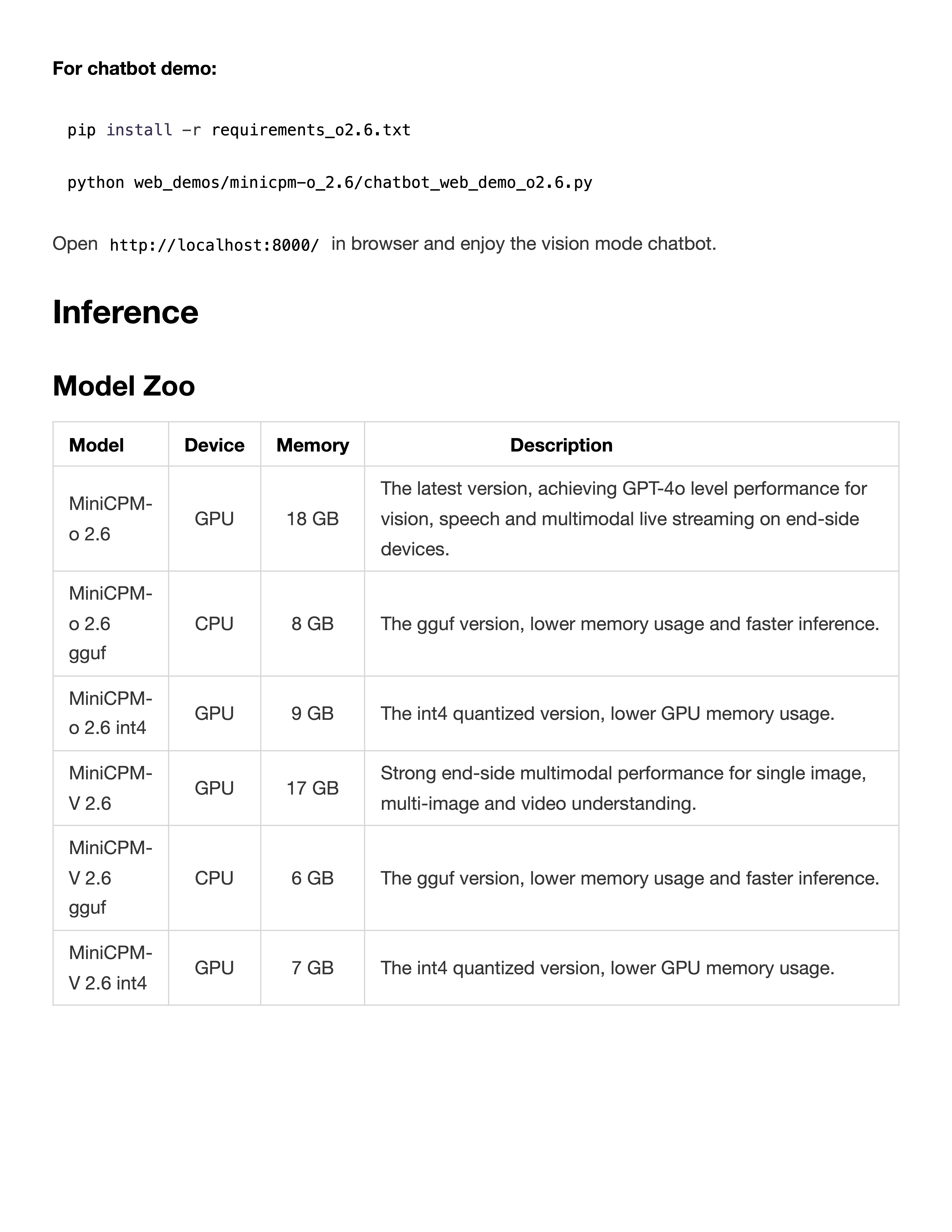
Example Output
For chatbot demo:

pip install -r requirements_o2.6.txt
python web_demos/minicpm-o_2.6/chatbot_web_demo_o2.6.py

Open http://localhost:8000/ in browser and enjoy the vision mode chatbot.

Inference

Model Zoo

| Model | Device | Memory | Description |
|---|---|---|---|
| MiniCPM-o 2.6 | GPU | 18 GB | The latest version, achieving GPT-4o level performance for vision, speech and multimodal live streaming on end-side devices. |
| MiniCPM-o 2.6 gguf | CPU | 8 GB | The gguf version, lower memory usage and faster inference. |
| MiniCPM-o 2.6 int4 | GPU | 9 GB | The int4 quantized version, lower GPU memory usage. |
| MiniCPM-V 2.6 | GPU | 17 GB | Strong end-side multimodal performance for single image, multi-image and video understanding. |
| MiniCPM-V 2.6 gguf | CPU | 6 GB | The gguf version, lower memory usage and faster inference. |
| MiniCPM-V 2.6 int4 | GPU | 7 GB | The int4 quantized version, lower GPU memory usage. |
Visual grounding
Sample Code
import re
from PIL import Image, ImageDraw
import torch
from transformers import AutoModel, AutoTokenizer

def setup_model_and_tokenizer(model_path):
    dtype = torch.bfloat16
    model = AutoModel.from_pretrained(model_path, torch_dtype=dtype, trust_remote_code=True)
    model = model.to(dtype=torch.bfloat16)
    model = model.eval().cuda()
    tokenizer = AutoTokenizer.from_pretrained(model_path, trust_remote_code=True)
    return model, tokenizer

def extract_bbox_from_response(response):
    match = re.search(r"<box>([\d\s]+)</box>", response)
    if match:
        bbox_str = match.group(1)
        bbox = list(map(int, bbox_str.strip().split()))
        return bbox
    else:
        raise ValueError("Can't find bbox in response")

def draw_bbox_on_image(image, bbox):
    w, h = image.size
    x1 = int(bbox[0] / 1000 * w)
    y1 = int(bbox[1] / 1000 * h)
    x2 = int(bbox[2] / 1000 * w)
    y2 = int(bbox[3] / 1000 * h)
    draw = ImageDraw.Draw(image)
    draw.rectangle([x1, y1, x2, y2], outline="red", width=4)
    return image

def model_infer_and_draw(img_path, question, model, tokenizer):
    image = Image.open(img_path)
    msgs = [
        {'role': 'user', 'content': [question, image]},
    ]
    with torch.inference_mode():
        res = model.chat(
            image=None,
            msgs=msgs,
            tokenizer=tokenizer,
            sampling=True,
            max_new_tokens=1024,
            max_inp_length=8192,
            use_image_id=True,
        )
    print("Model output:", res)
    bbox = extract_bbox_from_response(res)
    image_with_box = draw_bbox_on_image(image, bbox)
    return res, bbox, image_with_box

model_path = 'openbmb/MiniCPM-V-4_5'
img_path = './assets/airplane.jpeg'
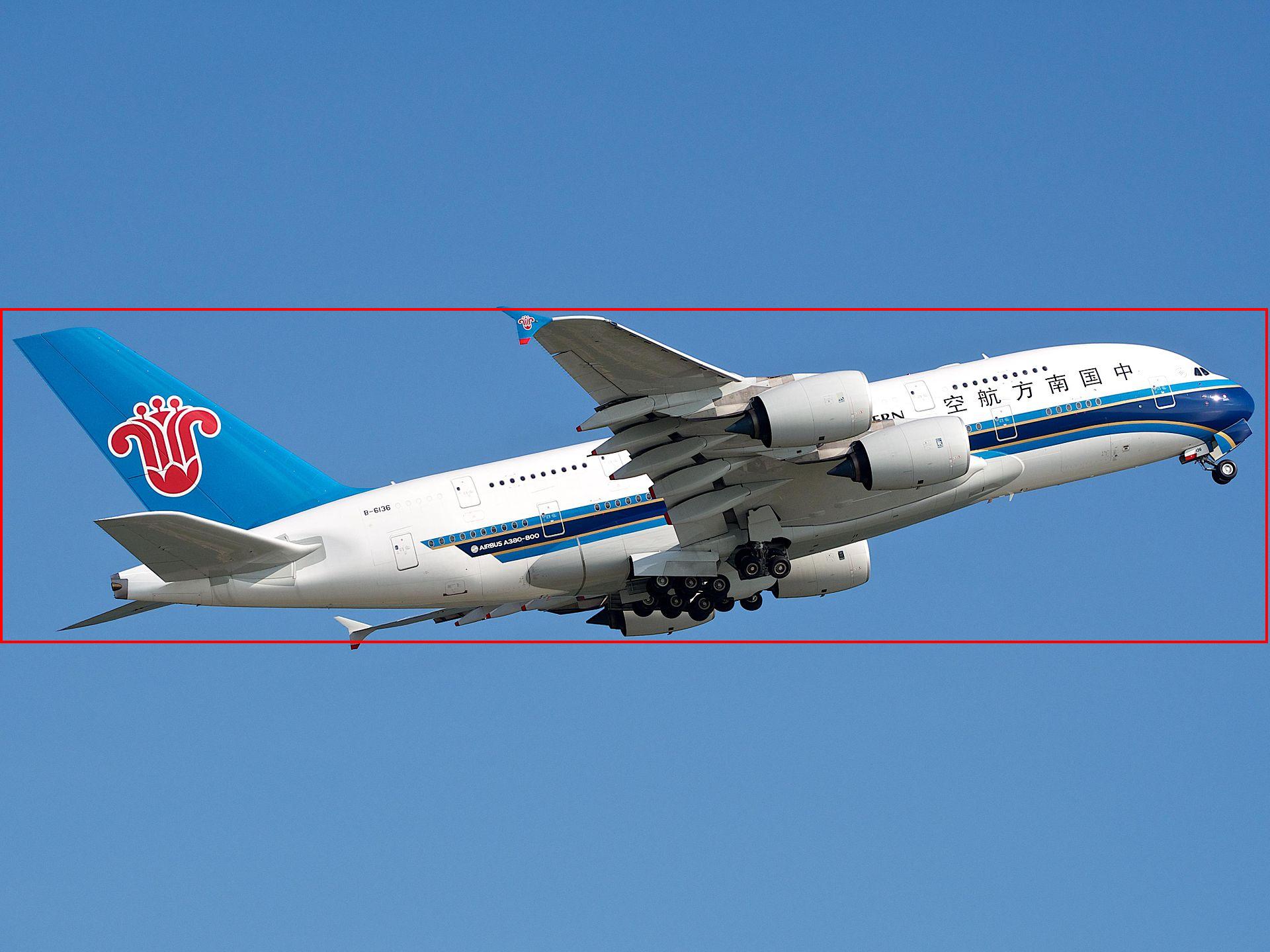
question = 'Please provide the bounding box coordinate of the region this sentence describes: <ref>airplane</ref>'

model, tokenizer = setup_model_and_tokenizer(model_path)
res, bbox, image_with_box = model_infer_and_draw(img_path, question, model, tokenizer)

out_path = './assets/airplane_grounding.jpeg'
image_with_box.save(out_path)
show case
airplane
model_path = 'openbmb/MiniCPM-V-4_5'
device = 'cuda'
img_path = './assets/airplane.jpeg'
question = 'Please provide the bounding box coordinate of the region this sentence describes: <ref>airplane</ref>'

model, tokenizer = setup_model_and_tokenizer(model_path, device)
res, bbox, image_with_box = model_infer_and_draw(img_path, question, model, tokenizer)

out_path = './assets/airplane-grounding.jpeg'
image_with_box.save(out_path)
Original image:
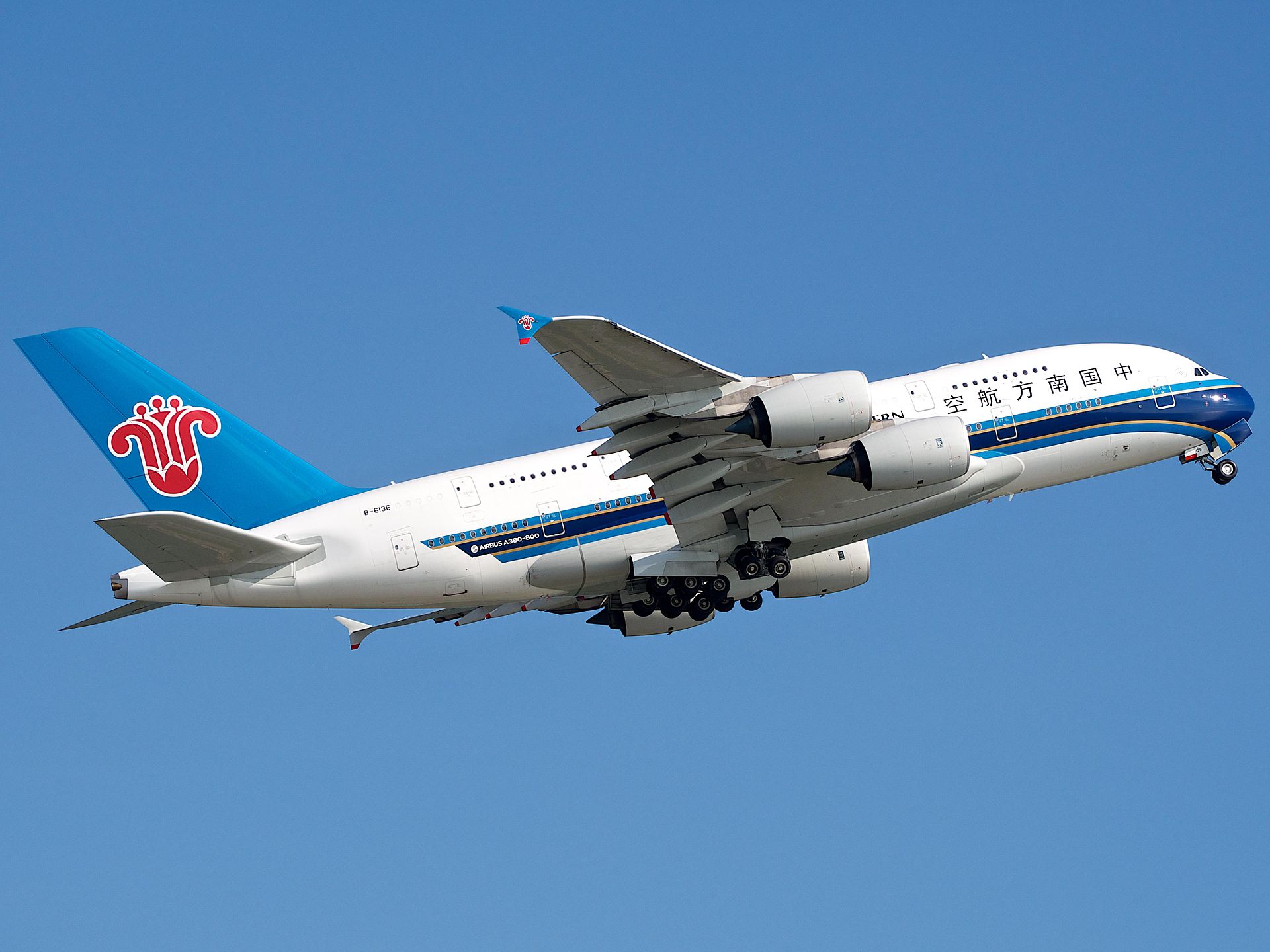
After grounding:
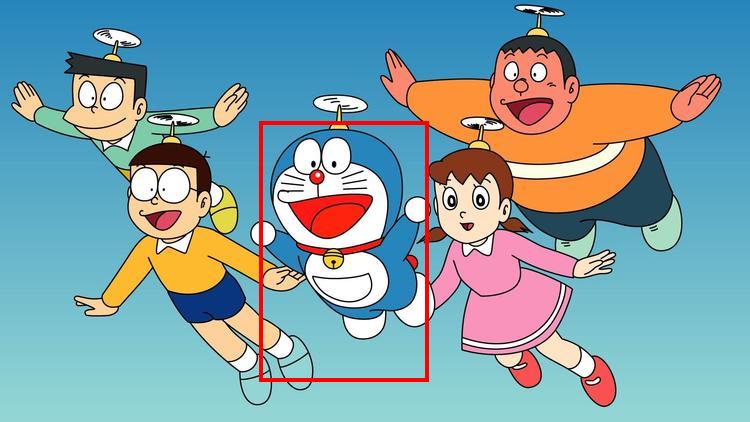
doraemon
model_path = 'openbmb/MiniCPM-V-4_5'
device = 'cuda'
img_path = './assets/doraemon.jpeg'
question = 'Please provide the bounding box coordinate of the region this sentence describes: <ref>doraemon</ref>'

model, tokenizer = setup_model_and_tokenizer(model_path, device)
res, bbox, image_with_box = model_infer_and_draw(img_path, question, model, tokenizer)

out_path = './assets/doraemon-grounding.jpeg'
image_with_box.save(out_path)
Original image:

After grounding:
Multiple Objects
import re
from PIL import Image, ImageDraw
import torch
from transformers import AutoModel, AutoTokenizer
import json
def setup_model_and_tokenizer(model_path):
    dtype = torch.bfloat16
    model = AutoModel.from_pretrained(model_path, torch_dtype=dtype, trust_remote_code=True)
    model = model.to(dtype=torch.bfloat16)
    model = model.eval().cuda()
    tokenizer = AutoTokenizer.from_pretrained(model_path, trust_remote_code=True)
    return model, tokenizer

def extract_bbox_from_json_response(response):
    response_json = json.loads(response)
    bbox_list = []
    name_list = []
    for item in response_json:
        bbox_str = item.get("box", "")
        # remoeve "<box>" and "</box>" if exists
        bbox_str = re.sub(r"</?box>", "", bbox_str)
        name_list.append((item.get("name_en", ""), item.get("name_zh", "")))
        bbox = list(map(int, bbox_str.strip().split()))
        bbox_list.append(bbox)
    return bbox_list, name_list

def draw_multiple_bboxes_on_image(image, bbox_list, name_list):
    w, h = image.size
    draw = ImageDraw.Draw(image)
    for bbox, names in zip(bbox_list, name_list):
        x1 = int(bbox[0] / 1000 * w)
        y1 = int(bbox[1] / 1000 * h)
        x2 = int(bbox[2] / 1000 * w)
        y2 = int(bbox[3] / 1000 * h)
        draw.rectangle([x1, y1, x2, y2], outline="red", width=4)
        draw.text((x1, y1 - 10), f"{names[0]} / {names[1]}", fill="red")
    return image

def model_infer_and_draw(img_path, question, model, tokenizer):
    image = Image.open(img_path)
    msgs = [
        {'role': 'user', 'content': [question, image]},
    ]
    with torch.inference_mode():
        res = model.chat(
            image=None,
            msgs=msgs,
            tokenizer=tokenizer,
            sampling=True,
            max_new_tokens=1024,
            max_inp_length=8192,
            use_image_id=True,
        )
    print("Model output:", res)
    bbox, name_list = extract_bbox_from_json_response(res)
    image_with_box = draw_multiple_bboxes_on_image(image, bbox, name_list)
    return res, bbox, image_with_box

model_path = 'openbmb/MiniCPM-V-4_5'
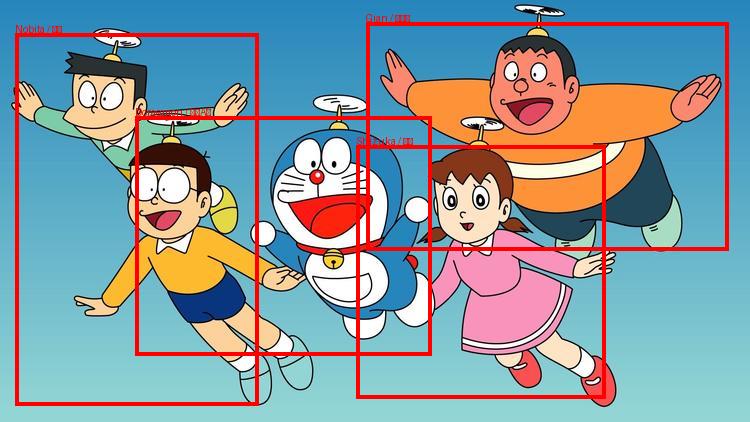
img_path = '/cache/liuqilin/draft/example/qwen2v4_5/assets/doraemon.jpg'
question = 'Identify all characters in the image and return their bounding boxes and English name and Chinese name in JSON format, a list of {"name_en": "Doraemon", "name_zh": "哆啦A梦","box", "x1 y1 x2 y2"}'

model, tokenizer = setup_model_and_tokenizer(model_path)
res, bbox, image_with_box = model_infer_and_draw(img_path, question, model, tokenizer)

out_path = './assets/doraemon_multi_grounding.jpg'
image_with_box.save(out_path)
Original image:
After grounding: